
Integrations
Referrals and physician communication
Most referrals reach a therapy clinic by fax, letter or phone, and staff enter them in ArkCloud Rehab. An electronic referral connection is built for referring organisations that can send FHIR. ArkCloud has a directory of referring providers and a sharing workflow for signed notes, but no Direct or fax service is connected to carry them, so notes and plans still go to the physician outside ArkCloud and you record the certification when it comes back.
Written for: Front desk and intake staff · PT, OT and SLP clinicians · Rehab administrators
What works today
| Capability | Status | What that means here |
|---|---|---|
| Entering a referral by hand (including faxed referrals) | Available | Staff enter a referral from a fax, letter or phone call in Rehab or Access. Converting the referral creates the patient and the episode of care. ArkCloud does not receive faxes itself. |
| Electronic referrals from a referring EHR (FHIR) | Not independently verified | Built: referrals received over FHIR R4 from a referring organisation's system arrive on Rehab's Electronic referrals screen for a person to review, and status updates go back to the referrer. Each organisation sets up its own connection, and it has never been proven with a real referring partner.Requires: A referral-exchange connection your Rehab administrator sets up with the referring organisation. |
| Receiving or sending faxes | Not available | There is no fax line or fax service in ArkCloud. A faxed document is entered or uploaded by staff. |
| Recording a physician's plan-of-care certification | Available | The physician signs the plan of care outside ArkCloud. A clinician with signing authority, or a Rehab administrator, then records who certified it, their NPI, the date signed and the date the certification runs to; ArkCloud shows when it has expired. |
| Referring-provider directory | Partially available | Staff can add an outside physician or practitioner with an NPI (checked for a valid check digit) and a Direct address or fax number, and mark the entry verified, recording how it was checked. There is not yet a screen to edit or remove an entry, or to match a referral to an entry. A listed provider gets no access to ArkCloud. |
| Sending signed notes and plans to physicians | Needs an external connection | ArkCloud has the sharing workflow - verified recipients, a confirmation step, a purpose (for information, or asking the physician to certify a plan of care) and delivery tracking - but no Direct messaging or fax service is connected, so nothing is sent to a physician today.Requires: A Direct (HISP) or fax service, under a business associate agreement, connected to ArkCloud by us. |
| Direct secure messaging | Not available | ArkCloud has no Direct secure messaging address or connection. |
Entering a referral
Use this for every referral that arrives on paper, by fax, by phone or through a referral portal outside ArkCloud.
ArkCloud Rehab → Referrals → Record referral
- Choose Record referral and enter the patient's first and last name and date of birth.
- Enter the referring provider and organisation, the discipline (or leave it as not yet decided), the setting, the urgency (routine or urgent) and the reason for referral as written on the order.
- Choose Record referral. It appears in the Open view of the referrals list.
- When the clinic accepts the patient, open the referral and choose Accept into care. This creates the patient record and opens the episode of care in one step. The panel opens on finding an existing patient by name or MRN: if the patient is already registered, choose them rather than creating a second record.
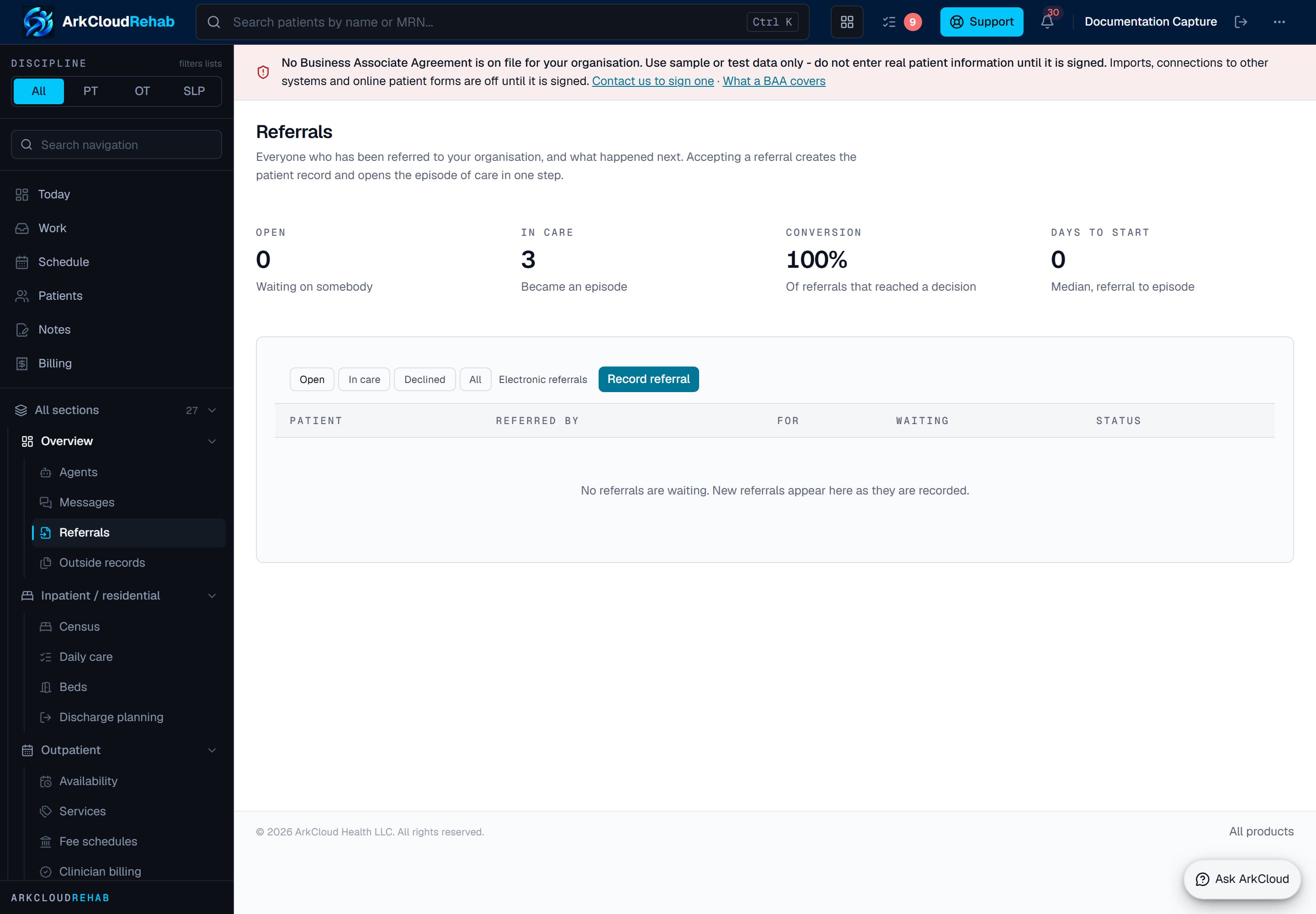
The Rehab referrals list, with Record referral and the link to Electronic referrals. Real screen · synthetic data.
/rehab/referrals
In ArkCloud Access, front desk staff can take the referral first and an administrator sends it to Rehab; see Access referrals.
Electronic referrals (FHIR)
Electronic referrals from a referring EHR (FHIR)Not independently verified
Built: referrals received over FHIR R4 from a referring organisation's system arrive on Rehab's Electronic referrals screen for a person to review, and status updates go back to the referrer. Each organisation sets up its own connection, and it has never been proven with a real referring partner.
Requires: A referral-exchange connection your Rehab administrator sets up with the referring organisation.
When a referring organisation can send referrals as FHIR R4, a Rehab administrator can connect it. Each organisation sets up its own connection with each referring partner; ArkCloud does not provide a shared referral network.
ArkCloud Rehab → Referrals → Electronic referrals
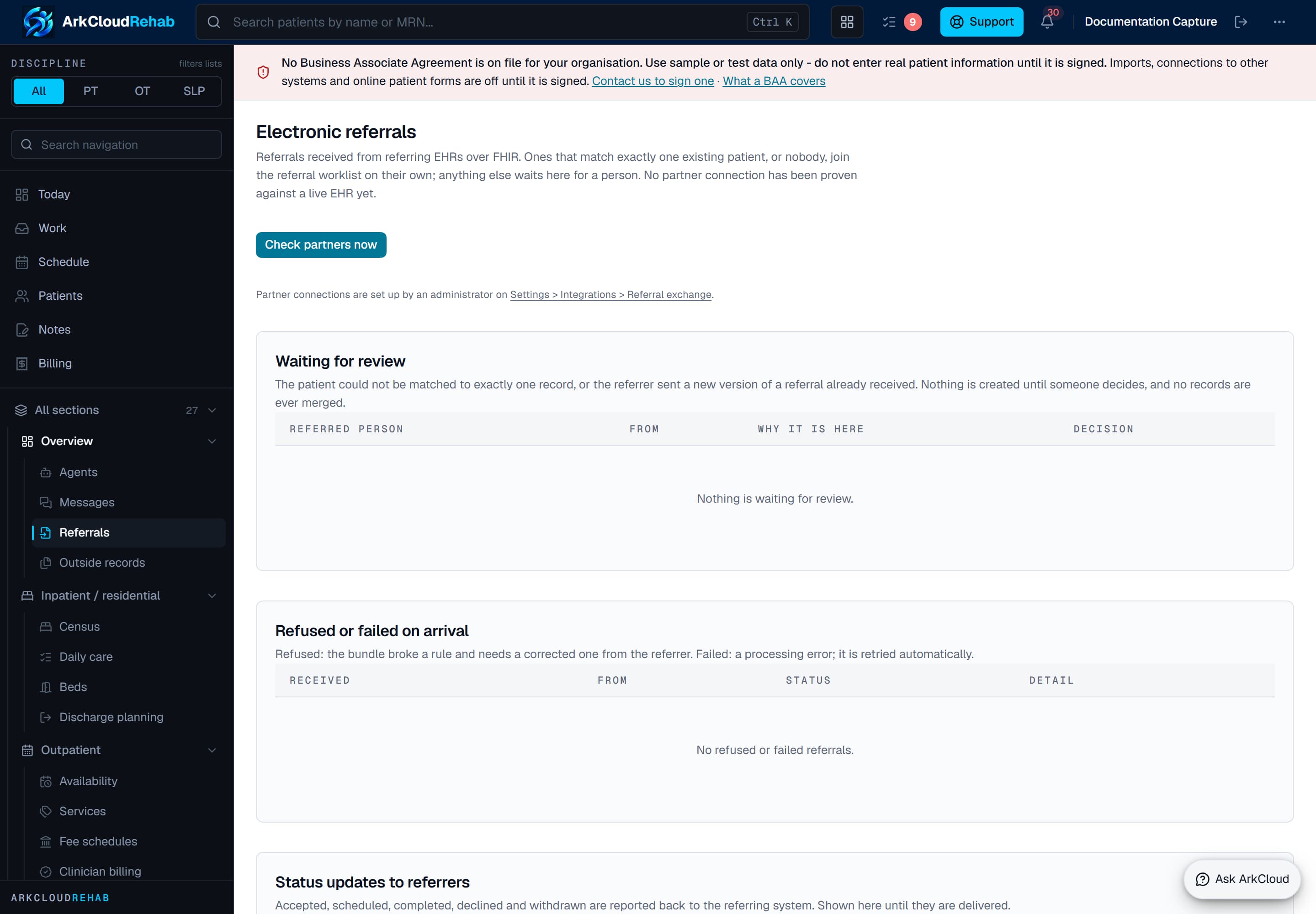
The Electronic referrals screen with its three lists, empty here because no partner connection is set up. Real screen · synthetic data.
Empty state. Captured in a demonstration organisation with no records of this type yet. The controls, columns and filters are the ones a populated screen uses.
/rehab/referrals/electronic
| Field or control | What it means |
|---|---|
| Waiting for review | Referrals that arrived and need a person - usually to confirm which patient they belong to. ArkCloud never merges patient records on its own. |
| Refused or failed on arrival | Referrals that could not be accepted, with the reason. |
| Status updates to referrers | Accepted, scheduled, completed or declined notices sent back to the referring organisation. A failed update can be queued again. |
To set up a connection, an administrator follows the link on that screen to the referral exchange settings. Checking the settings confirms only that they are complete; it does not contact the partner.
Recording plan-of-care certification
Where a payer requires the physician or non-physician practitioner to certify the plan of care, the signing happens outside ArkCloud - on paper, by fax or in the physician's own system. ArkCloud records the result.
ArkCloud Rehab → Episodes → (episode) → Goals & outcomes → Treatment plan
- Sign the plan of care. A plan cannot be certified until it is signed.
- Send the signed plan to the physician the way your clinic does today (fax, post, or the physician's portal). ArkCloud cannot send it yet - see below.
- When the signed plan comes back, file it on the patient's Documents tab with the Signed plan of care template, then choose Record certification on the treatment plan.
- Enter Certified by, the NPI if you have it (10 digits), Signed on and Certified through, then save.
- For a recertification, choose Record recertification and enter the new dates. The latest one is in force, and earlier ones stay in the history.
A clinician with signing authority can record it, and so can a Rehab administrator. The plan then shows as certified, or as expired once the certified-through date has passed.
The referring-provider directory
Referring-provider directoryPartially available
Staff can add an outside physician or practitioner with an NPI (checked for a valid check digit) and a Direct address or fax number, and mark the entry verified, recording how it was checked. There is not yet a screen to edit or remove an entry, or to match a referral to an entry. A listed provider gets no access to ArkCloud.
A referral records its provider as typed text, which is not an address. The Outside providers directory holds the physicians and practitioners your clinic sends documents to, each checked by a person. Listing someone gives them no access to ArkCloud.
- Open Outside providers in ArkCloud Rehab. It is not yet linked from the Rehab menu or from another screen while no sending channel is connected: add
/rehab/providersto your ArkCloud address and bookmark it. - Add the provider's name, organisation, NPI (ArkCloud checks it is a valid 10-digit NPI), phone, and a Direct address or a fax number - at least one of the two is required.
- Check the details, then press Verify this provider and record how: checked in the NPI registry, confirmed by phone with the practice, or confirmed in writing by the practice. The entry shows who verified it and when. Only a verified entry can be chosen as a recipient.
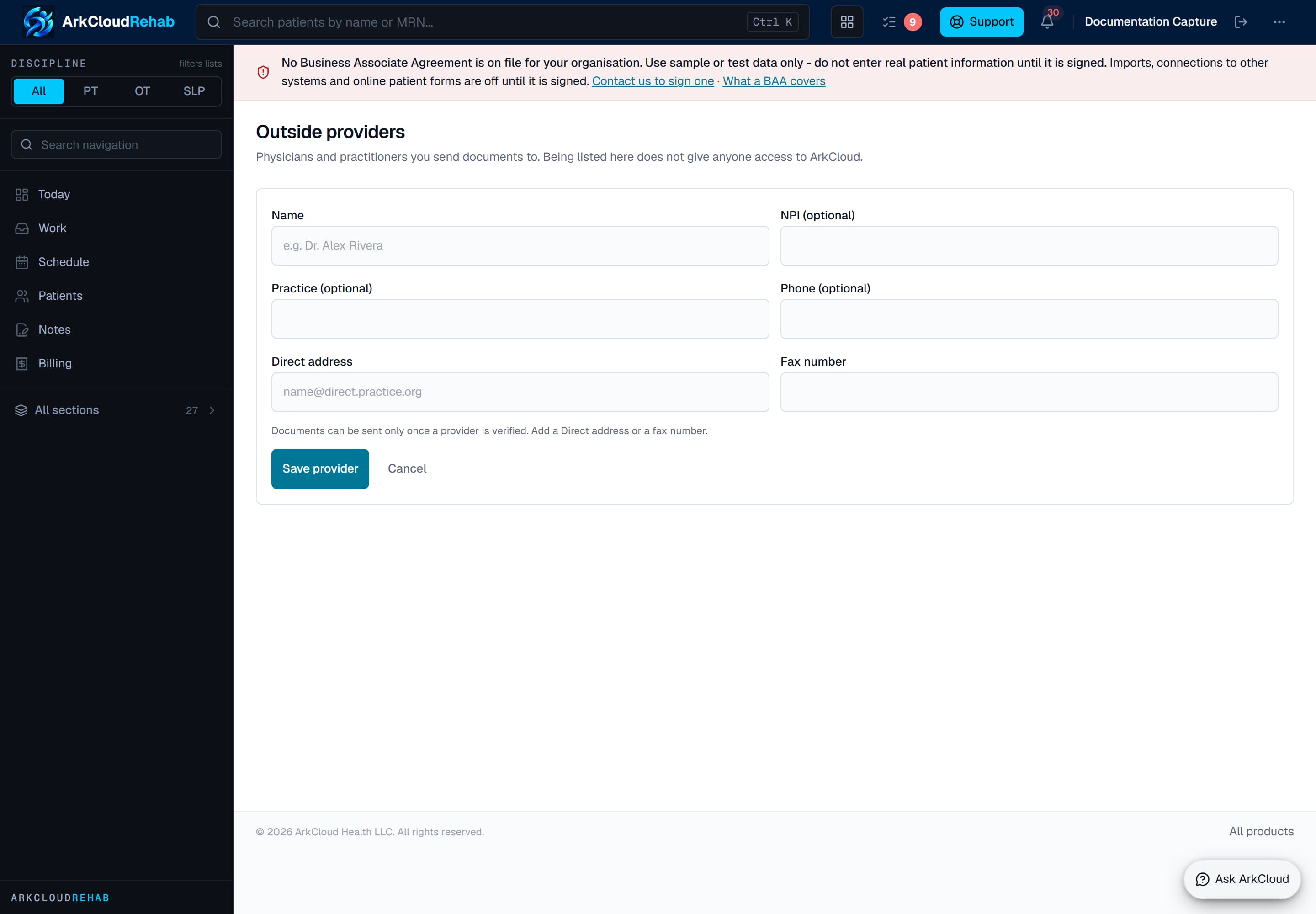
Adding an outside provider: a Direct address or a fax number is required, and documents can be sent only to a verified entry. Real screen · synthetic data.
Empty state. Captured in a demonstration organisation with no records of this type yet. The controls, columns and filters are the ones a populated screen uses.
/rehab/providers
There is not yet a screen to edit or remove an entry, or to link a referral to a directory entry, so the share panel never pre-selects the referring provider.
Sending notes and plans to physicians
Sending signed notes and plans to physiciansNeeds an external connection
ArkCloud has the sharing workflow - verified recipients, a confirmation step, a purpose (for information, or asking the physician to certify a plan of care) and delivery tracking - but no Direct messaging or fax service is connected, so nothing is sent to a physician today.
Requires: A Direct (HISP) or fax service, under a business associate agreement, connected to ArkCloud by us.
Today, nothing in ArkCloud sends a note, evaluation or plan of care to a physician. Send the signed document outside ArkCloud, the way your clinic does now, and record the certification when it comes back.
ArkCloud Rehab → an episode → Notes → Share with an outside provider
The episode's Notes view lists the signed evaluations, plans of care, progress reports, re-evaluations, discharge summaries and daily notes that could be shared. Because no Direct secure messaging or fax service is connected, the panel says Sending is not available yet and offers no Share button.
How sharing will work once a channel is connected
- Only a signed note can be shared, and only by the clinician who wrote, signed or co-signed it, or a supervisor or administrator. Staff assigned only the registration function cannot share.
- You choose a verified provider, the channel, and the purpose - For information or Ask to certify the plan of care - and tick that you checked the note, the patient and the recipient.
- The physician receives a copy of the signed text exactly as signed, with the patient's name and date of birth, who signed it and when, and the purpose. Sending the same version to the same provider again needs Send again.
- Each send shows Waiting to send, Sent (accepted by the channel), Delivered (confirmed by the recipient's system) or Failed, with times. Sent or delivered does not mean the physician has read or certified anything; record the certification when it comes back.
- A failed or waiting send is retried only when someone presses Retry now.
Connecting a channel needs a contract with a Direct or fax provider, including a business associate agreement. Ask us if your clinic needs it.
Troubleshooting
| Field or control | What it means |
|---|---|
| "Sign the plan before recording its certification" | The plan is still a draft. Sign it first, then record the certification. |
| "An NPI is 10 digits" | Leave the NPI blank if the certification arrived without one, or correct it. |
| "Sending is not available yet" | Expected: no Direct or fax service is connected. Send the signed document outside ArkCloud. |
| A provider's details are wrong in the directory | There is no edit screen yet. Add a corrected entry and verify it; do not use the wrong one. |
| An electronic referral is waiting for review | ArkCloud could not be sure which patient it belongs to. Open it and choose the patient, or create a new one. |