
Outside records
How ArkCloud Rehab receives records from other organisations, confirms which patient they belong to, and how a clinician reviews them before anything reaches the chart or an evaluation.
What counts as an outside record
Anything another organisation sends about a patient: referral packets, discharge summaries, consult and progress notes, operative notes, imaging reports, medication lists and continuity-of-care documents (C-CDA). Each is kept exactly as received, with where it came from, its clinical date and when it arrived.
The upload form asks for the document type - Referral, Discharge summary, Progress note, Consult note, History and physical, Operative note, Imaging report, Medication list, Continuity of care document (CCD) or Other - how it arrived (Sent to us electronically or Fax or paper, scanned), a title, and the organisation that sent it.
Who does what
- Front desk and other staff upload records, choose the patient, and may transcribe items from a document (a diagnosis, a precaution, a medication) as proposals for review.
- A credentialed clinician decides each proposal. Front-desk staff do not verify diagnoses, precautions or anything else clinical, and nothing they transcribe reaches the chart until a clinician accepts it.
- Supervisors and administrators work the queue of records whose patient is not yet confirmed.
| Capability | Status | What that means here |
|---|---|---|
| Uploading scanned and electronic documents (outside records) | Available | Any Rehab user can upload a PDF, scanned image (JPEG, PNG, TIFF), C-CDA or FHIR bundle file from Outside records or from a patient's chart, naming the document type and the sending organisation. |
| Virus and malware scanning of uploads | Available | Every uploaded outside record is scanned before anyone can open it; a file that is infected, still being scanned or could not be scanned cannot be opened. Patient uploads in the portal are scanned before they are stored and refused if the scan fails. |
| Clinician review of outside-record information | Available | Anyone who can read a record can transcribe items from it as proposals. Only a credentialed clinician can accept, edit, reject or defer them; nothing reaches the chart without that decision. |
| Reading text from scanned documents (OCR) | Not available | ArkCloud does not read the text of a scanned page or photo. Information from a scanned document reaches the chart only when a person transcribes it and a clinician accepts it. |
| Patient Documents tab, upload templates and document sign-off | Available | On a patient's Documents tab, Add a document offers one-press templates for a physician referral, signed plan of care, insurance card, photo ID, signed consent and letter, which fill in the category, title and how it arrived. Any filed document can be sent to a named colleague to sign off as reviewed. |
Receiving a record
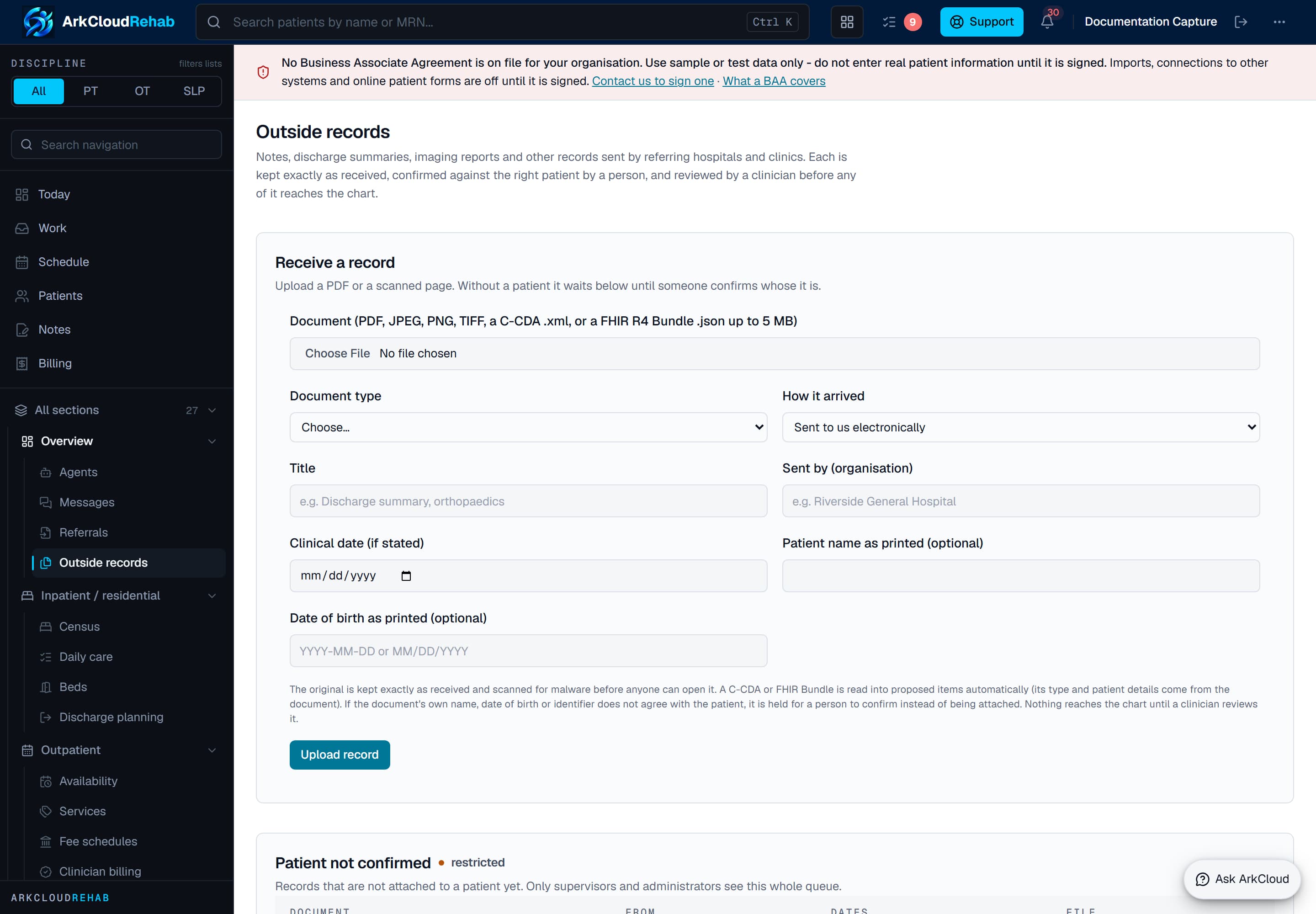
Receiving a record: the file, its document type, how it arrived, who sent it, and the patient details as printed. The 5 MB on this screen is the limit for FHIR bundle files; scans and documents may be up to 25 MB. Real screen · synthetic data.
/rehab/outside-records
- Upload (Rehab > Outside records, or Add a document on a patient's Documents tab): a PDF, a scanned page (JPEG, PNG, TIFF) or a C-CDA
.xml, up to 25 MB. The file's actual content is checked, not just its name. The same file from the same organisation is received once, however many times it is sent. - FHIR R4 Bundle file (
.json, up to 5 MB and 500 entries) - for example a patient-portal export or an HIE download. ArkCloud reads Condition, Procedure, AllergyIntolerance, MedicationRequest, MedicationStatement, Observation (inhaled oxygen only), ServiceRequest, ImagingStudy, DiagnosticReport and DocumentReference. Each becomes a proposal for review, citing the bundle, the resource and its version and last-updated time. A bundle about more than one patient, or with a resource about someone else, is refused whole. Resource types ArkCloud does not read are listed in the record's import report, never silently dropped. An attachment given only as a link is not fetched. Sending the same bundle again creates nothing new; a newer version replaces proposals nobody has decided yet and never changes a decision already made. - HL7 v2 message file (ADT^A04, ADT^A08 and ORU^R01 only) is a sandbox feature, off unless your deployment enables it. It is not an HL7 interface: no MLLP listener, no feed, no acknowledgements.
- Import from a hospital (from a patient's chart, Clinical history tab) when an administrator has set up and verified a connection to that hospital. See Hospital connections.
- Every original is scanned for malware before anyone can open it. If no scanner is configured, originals cannot be opened in production and the screen says so.
Confirming the patient
A record uploaded without a patient waits in Patient not confirmed, which only supervisors and administrators see in full (others see the records they uploaded). ArkCloud suggests patients - the same identifier from the same issuing organisation, or a matching name and date of birth - but a person chooses. Patient records are never merged. An identifier number from one hospital is never compared with another hospital's.
A structured record (FHIR Bundle, HL7 v2 message, hospital import) attaches itself to a patient only when all of these hold: an identifier it states, with its issuing organisation, was already linked to exactly one patient here by a person; that patient has not been merged; the record states an identical date of birth; and the name it states agrees. Anything else - no linked identifier, identifiers linked to two patients, a different date of birth or name, a merged patient, or a name and date of birth with no identifier - holds the record in Patient not confirmed for a person to decide. Uploading from a patient's chart is checked the same way: if the document itself states a different date of birth, name or identifier, it is held instead of being attached to that chart. A record is attached to an episode only when a person chose it, and the database refuses an episode that belongs to a different patient.
Moving a record to a different patient needs a reason and is kept in the record's history. A record whose content was already accepted into a chart cannot be moved until those entries are retracted.
Clinical review
The review screen shows the original beside the items drawn from it - conditions and diagnoses, surgical history, medications, allergies, oxygen use, assistive devices, precautions and restrictions - each with where it appears in the document, the side of the body when stated, whether it is current or past, and how certain the source is. Items come from staff transcribing the document, from a hospital import, from a C-CDA or FHIR Bundle (which also carry imaging study details and orders placed elsewhere - accepting an order records it; it orders nothing here), or (where enabled) from AI suggestions that quote the document word for word.
Only a credentialed clinician - a discipline grant, an active staff record and an unexpired licence - can accept, edit, reject or defer an item. Nothing reaches the chart without that decision.
- “No known allergies” is recorded only when a source states it. If no source has said anything about allergies, the chart says not recorded.
- When the chart already holds something different - another dose, the other side, an allergy where “no known allergies” was recorded - the conflict is shown and must be acknowledged. Replacing the existing entry is a separate, explicit choice. The same fact from a second source is linked, not duplicated.
- Oxygen readings from a hospital are labelled as measurements, not prescriptions. A flow rate is recorded only with its unit, and only when the source states it.
- An item marked unreadable cannot be accepted. Accepted items can be retracted with a reason; nothing is deleted.
What the chart shows, by category
The patient's chart lists outside information by category - medical history, surgical history, diagnoses, medications, allergies, imaging, discharge, orders, precautions, referrals, and oxygen and devices - and says where each stands: not received (no attached record supplied anything; this is not a statement that there is none), received (a document arrived and nothing has been proposed from it yet), pending review (not in the chart), accepted, rejected, or superseded by a newer delivery. Each pending line names the sending organisation and links to its source record. This summary is computed from stored states; no AI writes it.
Using reviewed information in an evaluation
From the patient's chart, Use in an evaluation adds chosen reviewed entries to a section of a draft note, each line naming its source. Signed notes are never offered and never change when the chart changes later.
Imaging
Imaging arrives as up to three separate things, and ArkCloud never treats one as another:
- The radiology report (an upload, a FHIR DiagnosticReport or an HL7 v2 ORU) is kept as reviewable text with its source, modality, body site, side and report status as stated; its stated conclusion or impression is proposed as an imaging finding.
- The study (a FHIR ImagingStudy) is recorded as details only: modality, body site, date, series and image counts, and the study identifier.
- The images are not available in ArkCloud. There is no image viewer and no PACS or DICOMweb connection, and a link a source provides is not followed. Every imaging record says to retrieve the images from the source.
Missing records
On the patient's chart, Records requested tracks what is missing and from whom, when it was asked for, and which received record fulfilled it. ArkCloud does not send the request; your staff ask by your usual channel.
Hospital connections
Administrators set up one connection per hospital (Rehab > Settings > Integrations > Hospital connections): the hospital's FHIR R4 address, its token endpoint, the client id the hospital issued, a signing key, and the identifier systems it uses. Only system access (SMART Backend Services) is supported. A connection shows “verified” only after a check against the hospital succeeds; until the hospital activates ArkCloud's client it shows “awaiting hospital activation”.
No hospital connection has been proven against a live EHR. Imports are tested against synthetic data only. Each hospital must register and activate ArkCloud under its own agreement.
What is and is not supported
- Fully implemented (tested with synthetic data): upload of PDFs, images and C-CDA; FHIR R4 Bundle file upload; the patient binding rule and the restricted queue; clinician review, conflicts and retraction; the category view; encrypted originals and malware scanning; missing-record tracking.
- Sandbox verified: HL7 v2 ADT^A04/A08 and ORU^R01 message files - verified only with synthetic messages in local tests, and off by default. The hospital FHIR import was also run once against a public reference server holding synthetic patients (not any hospital or EHR vendor).
- Requires partner integration: importing from a hospital over FHIR (each hospital must register and activate ArkCloud, under a business associate agreement); any HL7 v2 feed; Direct secure messaging; HIE networks; access to images.
- Not implemented: a DICOM viewer or DICOMweb retrieval; an inbound FHIR endpoint that hospitals push records to; SMART app launch; OCR; AI summaries of outside records.
No hospital is connected to ArkCloud today.
Referrals themselves are recorded on Referral intake. Scanning at the front desk, step by step, is on Documents and scanning.