
End-to-end workflow
The outpatient clinic day
How one outpatient therapy patient moves through ArkCloud: from the front desk registering them and receiving the referral, through check-in, the evaluation and daily SOAP notes, to signed documentation and a charge ready for billing. For each step: who does it, which screen owns it, and what carries over without anyone typing it again.
Written for: Front desk staff · PT, OT and SLP clinicians · Clinic administrators · Evaluators
About this walkthrough
The order of steps follows a practising outpatient clinician's high-level walkthrough of a clinic day, checked against what ArkCloud does today. It is not every clinic's policy. Your clinic may split the work differently - who books, who verifies benefits, who checks in - and ArkCloud does not force one split.
Most front-desk work can be done in either of two applications. ArkCloud Rehab is where the clinical record lives and where a therapy clinic usually works all day. ArkCloud Access is an optional front door over the same records: a check-in done in Access is the same check-in Rehab shows. The front desk guide says which to use for each task.
The day at a glance
1ArkCloud Rehab
Registration
Front desk adds the patient in Rehab, or sends an Access registration to Rehab.
2ArkCloud Rehab
Referral received
Recorded in Rehab Referrals or the Access queue. Scanned pages are filed on the patient's Documents tab.
3ArkCloud Rehab
Appointment scheduled
Booked against the episode from the service catalogue, on the clinician's availability.
4ArkCloud Rehab
Check-in
Check in on the Rehab schedule, or Mark arrived on the Access check-in board.
5ArkCloud Rehab
Therapist notified
The therapist learning that the patient has arrived.
Not available today. Check-in sends no alert. The therapist sees Checked in on the schedule or dashboard after opening or reloading it.
6ArkCloud Rehab
Patient Home
The tabbed patient chart (Home, Clinical history, Documents, Timeline, Registration & admin) and the episode's views.
7ArkCloud Rehab
Referral and chart review
Referral, outside records, precautions and history, reviewed by the clinician.
8ArkCloud Rehab
Evaluation or follow-up
Start visit, then Write note opens the episode's notes with the visit chosen.
9ArkCloud Rehab
SOAP documentation
Structured capture, optional AI draft where switched on; the clinician writes and edits.
10ArkCloud Rehab
Clinical review
The clinician checks the note against what happened. Co-signature where required.
11ArkCloud Rehab
Save and sign
The author signs with a second check of identity. Signed notes are not edited, only amended.
12ArkCloud Rehab
Future visits and progress
Course booked, goals and outcome scores tracked, progress reports when due.
13ArkCloud Rehab
Billing preparation
Complete records the service; an administrator posts the charge; the claim is built in ArkCloud RCM.
| Field or control | What it means |
|---|---|
| Accepting a referral into care | Creates or links the patient, admits them to Rehab and opens the episode in one step. The name and date of birth come from the referral. |
| Sending from Access to Rehab | The referrer, reason and urgency carry across. A person confirms the first/last name split and the date of birth. Administrators only. |
| Booking from the service catalogue | The booked service is what later becomes the billable service. Booking a free-text visit records nothing billable. |
| Checking in | Sets the visit to Checked in and records who did it. Nothing else: no alert, no message. |
| Start visit | Opens the visit record, so the note can be written against it. The Write note link appears only now. |
| Reviewed outside information | A clinician can insert accepted entries into a draft evaluation. Nothing from a scanned page reaches the chart without transcription and clinician review. |
| Completing the visit | Records the delivered service automatically. Posting the charge is a separate, manual step. |
| Insurance, benefits and authorizations | Entered by hand. Once recorded, benefits supply the copay and visit counts, and authorizations are checked before a charge is ready. |
The example patient
Example (synthetic patient)
Jordan Avery, born 12 April 1979, mobile 555-0142. Referred by a fictional orthopaedic practice, Lakeside Orthopaedics, for physical therapy for left knee pain, medial joint line, after a twisting injury. The referral arrives by fax with two pages of clinic notes. Jordan is booked for an initial evaluation and then twice a week for six weeks.
Every value in the example is invented and uses only choices the product's own lists offer. The clinical pick-lists are still under clinical review, so treat them as examples, not as validated content.
1-2. Registration and the referral
Jordan: the front desk receives the fax. They record the referral in Rehab with Jordan's name and date of birth, the referring practice and the reason, and file the two faxed pages on Jordan's Documents tab with the Physician referral template (type Referral, arrived “Fax or paper, scanned”). When the referral is accepted into care, Jordan's patient record and a physical therapy episode are created together.
| Field or control | What it means |
|---|---|
| Who | Front desk or intake staff. Accepting into care needs a discipline chosen, so some clinics have a clinician or lead accept. |
| Where | Rehab: Overview → Referrals (record, triage, Accept into care) and Records and revenue → Patients → Add patient. Access: Referrals and Registration, then Send to Rehab. |
| Carries over automatically | Accept into care creates or links the patient and opens the episode from the referral's details. From Access, the referrer, reason and urgency carry across. |
| Done by hand | Recording the referral (a faxed referral is typed in - there is no fax inbox). Choosing an existing patient: matching is by exact record number or by a person choosing, never by name alone. Sending from Access needs an administrator to confirm the name split and date of birth. |
| Detailed guides | Referral intake · Access referrals · Registration · Documents and scanning |
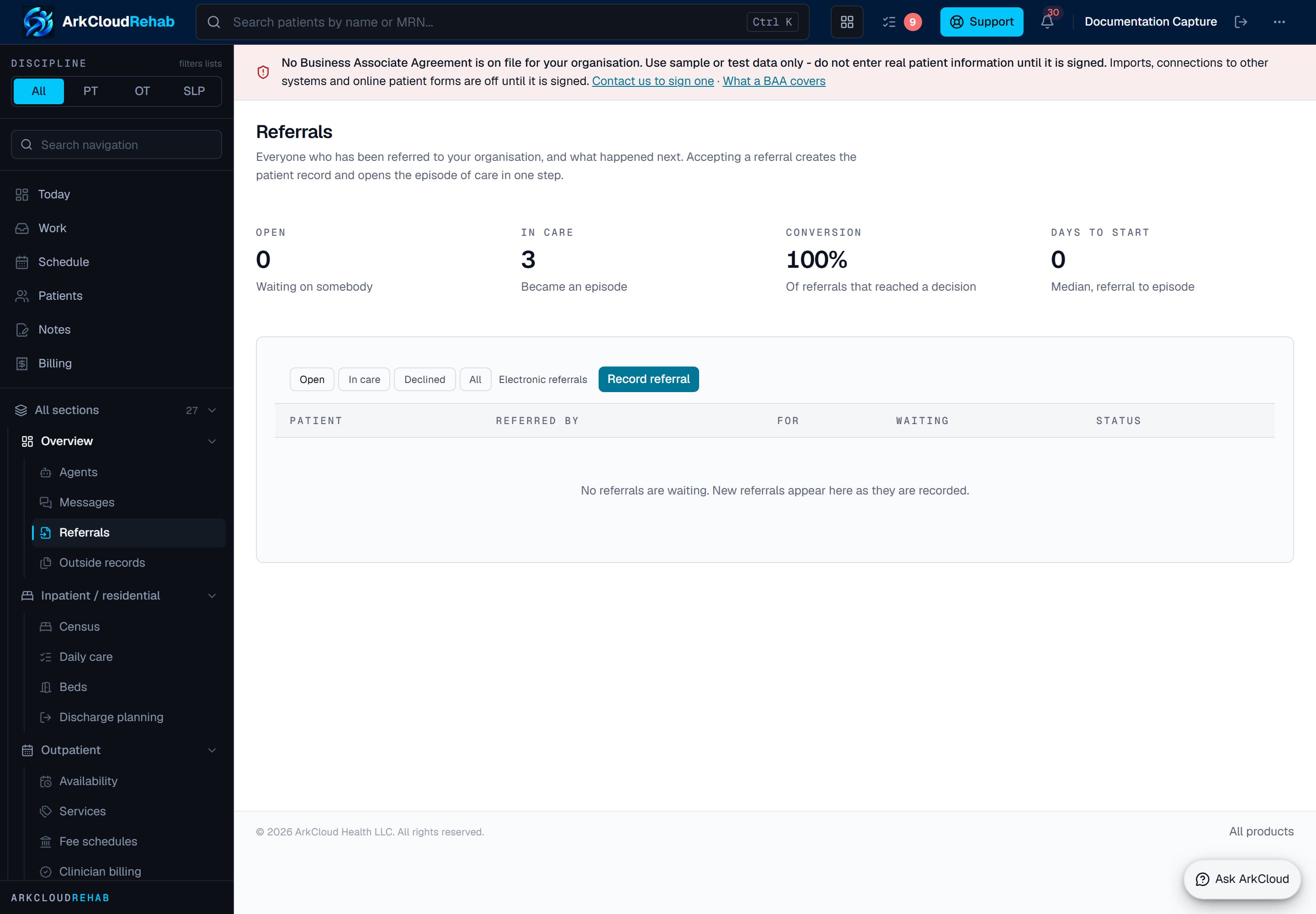
Real screen · synthetic data. The Rehab referral worklist, urgent referrals first, where a referral is triaged and accepted into care.
/rehab/referrals
Insurance is recorded at the same stage by registration staff: coverage on the episode's billing setup, benefits as stated by the payer by phone or portal, and any prior authorization. Electronic eligibility checks are not connected on the hosted service, so benefits are verified by phone or payer portal - see eligibility and prior authorization.
3. Scheduling the appointment
Jordan: the front desk books a course from the episode: the initial evaluation service first, then follow-up visits twice a week with the same physical therapist.
| Field or control | What it means |
|---|---|
| Who | Front desk or schedulers. Any Rehab role can book. |
| Where | Rehab: the episode's Care team & billing → Coverage, visits and billing → Visits, and Outpatient → Schedule for the day. Access: Scheduling for online booking settings and new-patient requests. |
| Carries over automatically | The service chosen from the catalogue travels with the appointment and later becomes the billable service. Bookings are checked against the clinician's leave and other visits. |
| Done by hand | Choosing service, clinician and times. A clash is refused unless you give a reason. Reminders are sent only if an administrator has turned them on. |
| Detailed guides | Rehab scheduling · Service catalogue · Booking, check-in, reminders and messages |
4-5. Check-in, and what the therapist sees
Jordan: arrives ten minutes early. The front desk presses Check in on Jordan's row of the schedule. The row now reads Checked in.
| Field or control | What it means |
|---|---|
| Who | Front desk. Any Rehab role can check a patient in. |
| Where | Rehab: Outpatient → Schedule → Check in. Access: Check-in → Mark arrived. Both do the same thing. |
| Carries over automatically | The visit status becomes Checked in, with who did it and when in the audit trail. |
| Done by hand | Telling the therapist, if your clinic wants that. ArkCloud does not. Online check-in from the portal, where switched on, does not mark the patient arrived either. |
| Detailed guide | Check-in and arrival |
The one exception is an urgent intake answer: if a patient's intake answer screens positive for an urgent symptom, the attending clinician, supervisors and administrators get an in-app alert.
6-7. Patient Home, referral and chart review
Jordan: the physical therapist opens Jordan from the schedule. Above the tabs, the chart shows no precautions recorded. On Clinical history, one outside record is awaiting clinical review - the faxed clinic notes. The therapist reads it and accepts a surgical-history entry the front desk transcribed from it, then goes back to Home and presses Evaluation beside the episode.
| Field or control | What it means |
|---|---|
| Who | The treating clinician. |
| Where | Patient Home is the patient's chart (Records and revenue → Patients, or the patient's name on the schedule), in tabs: Home, Clinical history, Documents, Timeline, and Registration & admin, with allergies and precautions above every tab. The episode page (Open episode on the schedule, or Write note to go straight to that visit's note) is in views: Overview, Notes, Evaluation, Goals & outcomes, Care team & billing, History. |
| Carries over automatically | Everything already recorded is on the chart's tabs and the episode's views: the referral on the episode's Evaluation view, filed documents, outside records with their review state, precautions, an interpreter or accessibility need, and history. |
| Done by hand | Reading the referral and records, and accepting or rejecting each item drawn from an outside record. Only a credentialed clinician can accept clinical information. Accepted entries can be inserted into a draft evaluation. |
| Detailed guides | Patient Home and the chart · Outside records · Clinical workspace |
If a registration detail looks wrong - a changed phone number, the wrong insurance - a clinician assigned the clinical staff function flags it for the front desk from the chart instead of editing it. The front desk is not notified; they work the open-flags list. See front-desk flags.
8-9. Evaluation or follow-up, and SOAP documentation
Jordan: the therapist presses Start visit, then Write note, and chooses Initial Evaluation. They record left knee flexion AROM 105° (right 128°), knee extension MMT 4- left and 5 right, McMurray test positive and Lachman negative, pain 5/10, and the goals. At later visits they write a visit note: therapeutic exercise and gait training on stairs, the patient's response, and goal progress.
Outpatient → Schedule → Start visit → Write note
| Field or control | What it means |
|---|---|
| Who | The treating clinician. |
| Where | The episode page's clinical documentation, opened by Write note with today's visit already chosen. Write note appears only after Start visit. |
| Carries over automatically | Earlier measurements, goals and the plan of care are on the episode for comparison. Previous values are not copied into today's note: today's findings are today's. |
| Done by hand | Everything the clinician observed and decided. Where your organisation has switched AI drafting on and the patient has agreed (if your clinic uses the AI agreement form), the clinician can ask for a draft from the structured entries, then edits or discards it. |
| Detailed guides | Initial evaluation · Visit note · SOAP guide · AI-assisted SOAP drafting |
Disciplines differ. An occupational therapy episode can add hand therapy, neurological or paediatric specialty sections (for example grip strength, edema, sensation and orthosis details). A speech-language pathology episode records communication and, within the configured scope, swallowing, with trials and cueing levels. There is no single physical therapy model applied to everyone.
10-11. Clinical review, save and sign
Jordan: the therapist reads the note through, corrects one sentence, and signs. ArkCloud asks for their authenticator code before the signature is applied.
| Field or control | What it means |
|---|---|
| Who | The note's author signs. A supervising clinician co-signs where the note requires it. |
| Where | The same documentation panel on the episode. Unsigned notes are listed on the Rehab work queue. |
| Carries over automatically | Signing releases the visit's recorded service from waiting on documentation, provided the signer meets the signing requirements. |
| Done by hand | The review itself, and the signature with a second identity check (authenticator code, or password if two-factor is not set up). A signed note is changed only by amendment. |
| Detailed guides | Review, signing and amendments · Daily work queue |
12. Future visits and progress
Jordan: the remaining visits are already booked from the course. The clinic has approved the LEFS, so the therapist records Jordan's score of 38 at the evaluation and 52 at the progress report; ArkCloud shows the change as arithmetic and which direction the scale counts as better. It does not call it improvement or significance.
| Field or control | What it means |
|---|---|
| Who | Clinician for documentation and goals; front desk for rebooking. |
| Where | The episode page (goals, plan of care, home exercise programme, outcome scores, progress reports) and the schedule. |
| Carries over automatically | Delivered visits are counted against the authorization. Baseline and latest outcome scores are shown side by side. |
| Done by hand | Booking further visits; recording the physician's plan-of-care certification after they sign it outside ArkCloud (ArkCloud does not send the plan to the physician). |
| Detailed guides | Progress report · Plan of care · Outcome measures |
13. Billing preparation
Jordan: the therapist presses Complete on the schedule when the visit ends. The evaluation service Jordan was booked under is recorded. Once the note is signed and coverage is in place, it appears as Ready to bill, and an administrator posts the charge.
| Field or control | What it means |
|---|---|
| Who | Clinician completes the visit; an administrator posts the charge; billing staff build the claim. |
| Where | Rehab: Outpatient → Schedule → Complete, then Records and revenue → Billing (Charge capture). ArkCloud RCM for the claim. |
| Carries over automatically | Completing the visit records the service from the catalogue service it was booked under. Completing and signing then refresh the service's billing readiness automatically - Ready to bill, or held with every reason (unsigned note, coding, coverage, authorization). Nothing creates a charge by itself. |
| Done by hand | Posting the charge: a Rehab administrator, who holds the fee-management permission, presses Post charge. Building the claim in ArkCloud RCM. Interventions written in the note never create or change a charge. |
| Detailed guides | Charge capture · Patient revenue cycle |
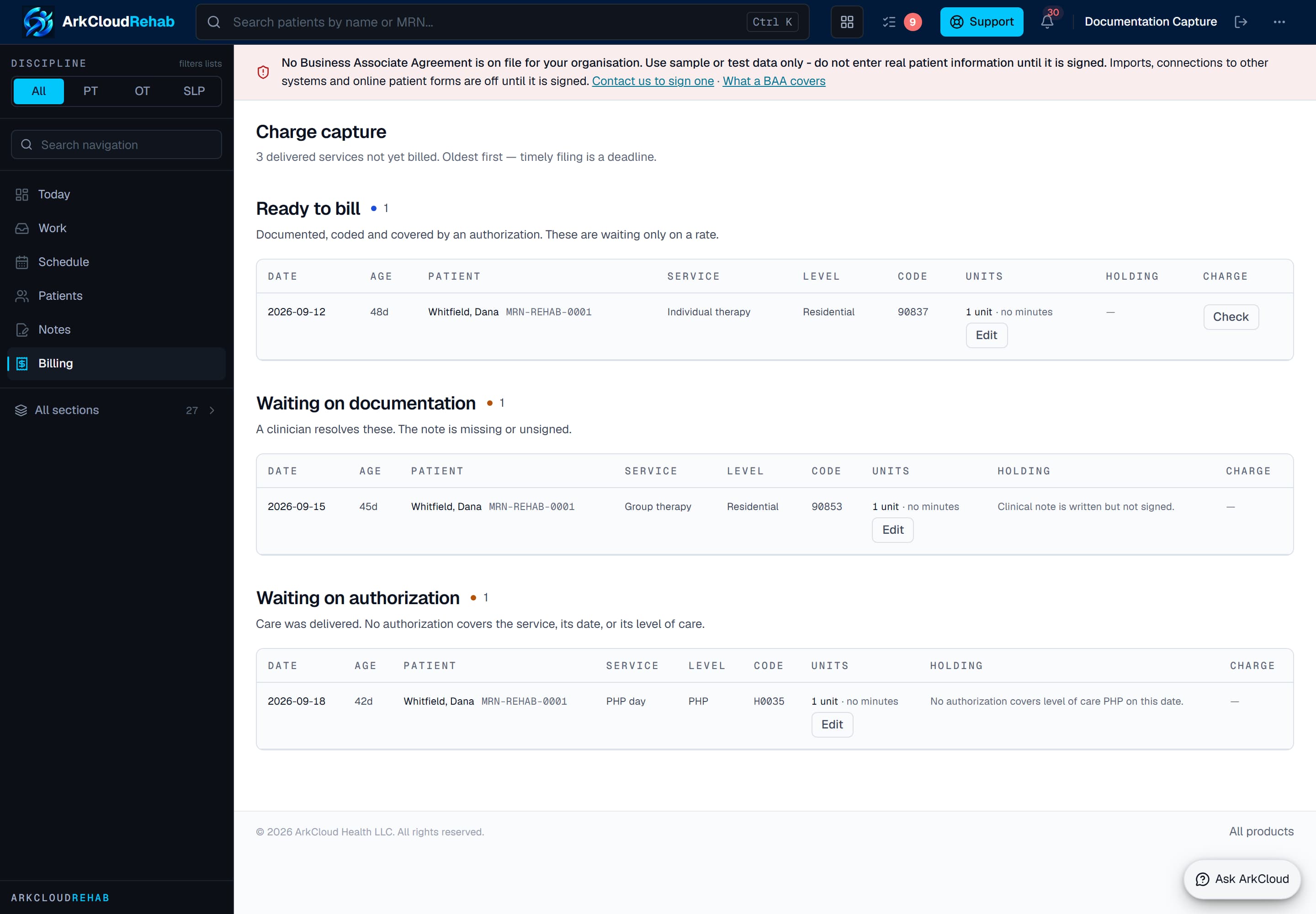
Real screen · synthetic data. The charge-capture worklist, grouped by what is holding each service. An administrator posts Ready to bill rows from here.
/rehab/billing
What works today, step by step
| Capability | Status | What that means here |
|---|---|---|
| Registering a patient (Rehab) | Available | Add patient searches for an existing record first, then creates one with name, date of birth and record number. A strong possible duplicate is refused unless someone confirms it. |
| Referral intake and acceptance into care (Rehab) | Available | Staff record a referral, triage it, and accept it into care. Accepting creates or links the patient and opens the episode in one step; an existing patient is matched only by exact record number or by a person choosing them. |
| Send to Rehab (referral, registration or waitlist entry) | Available | An Access administrator sends the record to Rehab after confirming how the name splits into first and last and the date of birth. Nothing is re-typed; nothing is guessed.Requires: An Access administrator, and an organisation that also has ArkCloud Rehab. |
| Uploading scanned and electronic documents (outside records) | Available | Any Rehab user can upload a PDF, scanned image (JPEG, PNG, TIFF), C-CDA or FHIR bundle file from Outside records or from a patient's chart, naming the document type and the sending organisation. |
| Patient Documents tab, upload templates and document sign-off | Available | On a patient's Documents tab, Add a document offers one-press templates for a physician referral, signed plan of care, insurance card, photo ID, signed consent and letter, which fill in the category, title and how it arrived. Any filed document can be sent to a named colleague to sign off as reviewed. |
| Electronic insurance eligibility checks | Needs an external connection | Built as a real payer inquiry, never simulated into an answer. Not connected on the hosted service today, so no eligibility answer is returned.Requires: Availity credentials, or a clearinghouse mailbox, configured for the deployment. |
| Benefits verification by phone or payer portal | Available | Staff record what the payer said, how and with what reference. It supplies the copay and counts visits against plan limits; it is not an electronic eligibility answer. |
| Booking visits and courses of visits | Available | Staff book single visits or recurring courses against an episode, from the service catalogue, on each clinician's availability. Clashes with leave or other visits are refused unless a reason is given. |
| Checking a patient in at the desk | Available | Check in on the Rehab schedule, or Mark arrived on the Access check-in board, sets the visit to Checked in and records who did it and when. |
| Alerting the therapist when a patient arrives | Not available | Checking a patient in sends no notification, message or alert to the therapist, and the schedule does not refresh by itself. The therapist sees Checked in on the schedule or the dashboard when the page is opened or reloaded. |
| Patient Home with tabs | Available | The patient chart is split into Home (Rehab record and episodes of care, with one-press links to start a note), Clinical history (allergy verification, outside records, problems and medications), Documents, Timeline, and Registration & admin. Allergies and precautions stay above the tabs. |
| Clinician review of outside-record information | Available | Anyone who can read a record can transcribe items from it as proposals. Only a credentialed clinician can accept, edit, reject or defer them; nothing reaches the chart without that decision. |
| Start visit and the Write note link | Available | After check-in, Start visit on the schedule opens the visit record. Only then does the row show Write note, which opens the episode at the notes with that visit already chosen. |
| From completed visit to charge | Available | Completing the visit records the service it was booked under. Completing and signing only refresh its billing readiness: Ready to bill, or held with each reason. Nothing creates a charge automatically; a Rehab administrator, who holds the fee-management permission, posts it with Post charge. |
| Sending claims to payers | Needs an external connection | Claims are built and checked in ArkCloud RCM, and are not transmitted on the hosted service today: no clearinghouse is connected, so a submitted claim answers Not sent and stays pending.Requires: A clearinghouse connection configured for the deployment. |