
ArkCloud Rehab
AI-assisted SOAP drafting
Inside a visit note, Draft SOAP note proposes Subjective, Objective, Assessment and Plan text from what you recorded for the visit. The draft sits beside your note: you decide what goes in, you edit it, and you sign it. Professional wording is not proof of clinical correctness; the clinician is responsible for the signed note.
Written for: Physical therapists · Occupational therapists · Speech-language pathologists · Clinical leads · Evaluators
Before you start
| Capability | Status | What that means here |
|---|---|---|
| AI-assisted SOAP drafting (visit notes) | Available with configuration | Switched on for this deployment. Drafts Subjective, Objective, Assessment and Plan text for a SOAP visit note from what is recorded; the clinician reviews, inserts, edits and signs.Requires: Your organisation's AI switch left on (Settings, AI). Where your clinic has added the patient AI agreement, the patient's signed yes to AI-assisted notes. |
| Patient AI agreement | Available with configuration | An optional form the clinic adds and sends to patients. Once added, it is enforced for the AI SOAP draft and for visit and evaluation recording. It is not enforced for the progress report and discharge summary drafts or for dictating a summary.Requires: An administrator adds it under Forms (Patient AI agreement, Add the AI agreement). Until it is added, nothing is gated by it. |
| AI review attestation at signing | Available | Signing a note that contains inserted AI text, or for which an AI draft was delivered, requires the signer to attest that they reviewed every AI-drafted section and that the signed note is their own documentation. |
- Your organisation's AI switch. An administrator can turn AI off for the whole organisation under Settings, AI. It is on unless someone turned it off. When it is off, the panel says drafting is switched off and you write the note as usual.
- The patient AI agreement, where your clinic uses it. If an administrator added the agreement under Forms, the SOAP draft runs only for a patient who signed it and answered yes to AI-assisted notes, and visit recording runs only for a patient who answered yes to audio recording. Those are the only two places it is enforced. It is not checked for the progress report and discharge summary drafts, or for dictating a summary. If your clinic has not added the agreement, nothing is gated by it. See intake and consent forms.
- Who can draft. The note's author (or a documentation supervisor) with Rehab clinical access, on an unsigned note.
- Which notes. Only SOAP visit notes: a Visit note, or an older SOAP note. An initial evaluation, re-evaluation or plan of care has no whole-note SOAP draft; there, the AI action beside each field drafts that section from what you typed - no recording needed. Progress reports and discharge summaries have their own narrative drafts, described below.
1. Start a draft
Episode → Notes → Clinical documentation → New document → Visit note → Document this visit
- Open the visit note for the visit you are documenting. The Document this visit panel sits inside the note.
- Record the visit in Quick Capture: pain, interventions and focuses, measurements, tolerance and goal progress. It saves as you tap. Answer anything listed under Still needed for this note; nothing is filled in for you.
- Optionally open Type or dictate notes and add brief visit notes, your own assessment and your plan.
- Resolve anything under Check before you review, for example a missing side, a 0 degrees that may be a placeholder, or a goal with no baseline.
- Select Draft SOAP note. The button is enabled once something from today is recorded. A draft usually takes under a minute; the button counts the seconds.
Your notes and capture are saved before the request, and the draft is made from what is saved. If you change them afterwards, the panel says the draft is out of date; select Draft again. There is an hourly limit per clinician (30 drafts by default).
2. What the draft uses
Every source is labelled today, standing or earlier visit, and each drafted section lists the sources it rests on under From:. The names below are the ones you see on screen.
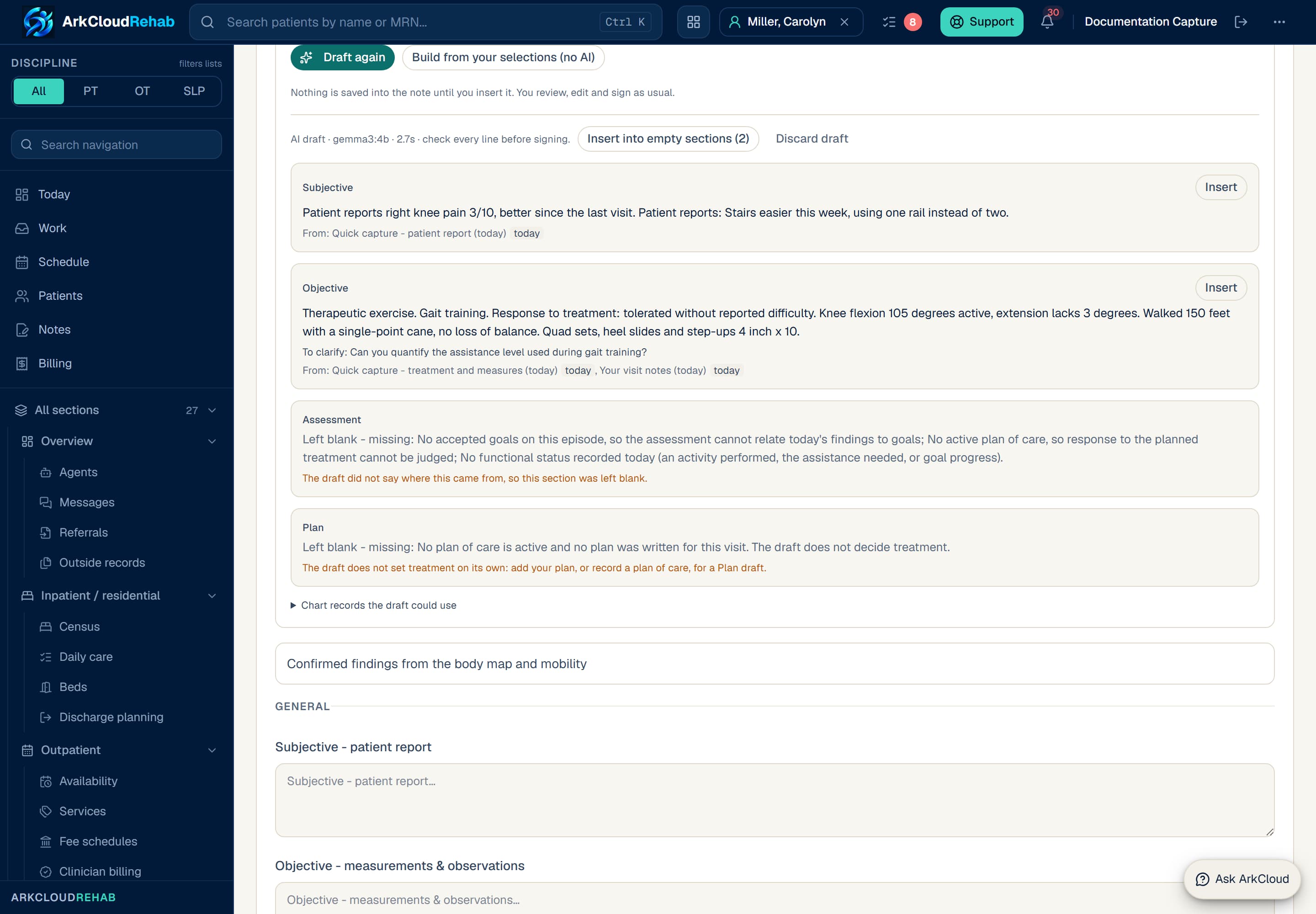
An AI draft beside a visit note. Subjective and Objective came from Quick Capture and the visit notes, each with its sources; Assessment and Plan were left blank because the episode has no goals or plan of care. Real screen · synthetic patient.
/rehab/episodes/f8aaf183-0fce-40be-8ec4-6baaf6258580?view=notes
| Field or control | What it means |
|---|---|
| Your visit notes (today) | The free-text box under Type or dictate notes. An in-room transcript you added with Add to visit notes lands here, under a heading that marks it as unverified speech-to-text with no speaker identified. |
| Your assessment (today) · Your plan (today) | The two optional boxes beside your visit notes. Your plan is what lets the draft write a Plan when no plan of care is active. |
| Your dictated summary (speech-to-text, today) | Every summary you dictated on this note with Dictate a summary, with your line corrections applied, unless you discarded it. It is a source as soon as it exists; Use in draft only refreshes the panel. |
| Quick capture - patient report / treatment and measures (today) | Pain, complaints, interventions and focuses, treatment activities, range of motion, strength grades, grip and pinch, edema, sensation, orthoses, SLP trial sets and swallowing observations, and tolerance, as you selected them for this visit. |
| Goal progress you selected (today) | The per-goal progress you chose in Quick Capture (progressing, no change, regressed, met, not assessed today). |
| Mobility and assistance (today) | Confirmed mobility and self-care observations dated today, with the assistance level and whether it was observed or reported. |
| Services recorded for this visit | The billable service recorded for this visit: its code, units and minutes. Never a price. |
| Confirmed today · Screening answered today | Body-map findings and special tests you confirmed on the visit date, and guided screening answered on the visit date. A No stays a denial. |
| Active goals · Plan of care · Active precautions | Standing records: up to six accepted goals with baseline and target, the active plan of care (frequency, duration, planned interventions), and up to six active precautions. |
| Documented diagnosis · Cognitive status · Home exercise programme (as prescribed) | Standing context. The home programme is what was prescribed - it never shows that it was taught or done today. |
| Confirmed finding (date) · Previous signed note (date) · Mobility at earlier visits | Earlier records, labelled with their date: findings confirmed at earlier visits, the Assessment and Plan of the most recent signed visit note, and earlier mobility observations. |
| Earlier values of today's measurements | The most recent earlier value of each range-of-motion or strength measurement you took today, with its date. Used only in Assessment. |
| Outcome measure scores entered by the clinician | Scores recorded on the episode up to the visit date, with baseline and change as arithmetic. Scores marked entered in error are left out. Used only in Assessment. |
Voice. A summary you dictate feeds the draft directly. An in-room recording does not: its transcript reaches the draft only if you add it to your visit notes, where it stays marked as unverified. See voice documentation.
Not read: the patient's name, date of birth, record number, address, payer or any charge amount; outside records and intake form answers; body-map selections you have not confirmed; and free-text comments on findings. The previous visit's values are never copied into today's findings.
3. How structured findings appear
What you select reaches the draft as plain sentences carrying the side, unit and assistance level you recorded - for example AROM left knee flexion 105 degrees. or Strength (MMT) left knee extension 4-/5. Range of motion, strength grades, special-test results and assistance levels belong in Objective; pain, complaints and screening answers in Subjective. A finding confirmed today can appear in Objective; one confirmed at an earlier visit appears only in Assessment, with its date.
Discipline matters. The draft writes the four SOAP sections only. The template's discipline and setting sections - for example Daily activities (ADL/IADL) & participation for OT or Swallowing for SLP - are yours to complete. SLP trial sets reach the draft worded with their cue level; check that the drafted sentence keeps it. See the PT, OT and SLP examples.
4. How the wording is checked
The model's answer is checked against its sources before you see it. What fails is removed, and the panel tells you how many sentences were removed and why. There are two kinds of check.
| Field or control | What it means |
|---|---|
| No source, or an unknown one | The draft did not say where a section came from, or cited a record it was not given. |
| An earlier record used for today | Subjective and Objective may rest only on today's notes, capture, dictation, screening and exam. An earlier record can never become something that happened today. |
| An Assessment with nothing from today | An assessment must rest on something recorded at this visit. |
| A Plan with no plan of yours | The draft does not set treatment. Without your plan, a plan of care or your dictation, Plan stays empty. |
| Unsafe content | Links, markup or instruction-like text. |
| Field or control | What it means |
|---|---|
| A number not in the record | Every number must appear in the sources that section cites (or be the visit date). |
| A side not in the record, or a value on the wrong side | Left, right or bilateral must be recorded, and a left value may not be reported as the right one. |
| A dropped minus sign | An extension deficit such as -5 degrees stays negative. |
| Two kinds of measurement compared | For example a pain score set against an angle. |
| An assistance level not in the record | Levels are never upgraded or downgraded. |
| A lost denial or a lost hedge | "Denies night pain" may not become night pain; "possible" or "?" may not become a fact. |
| A measurement in Subjective | Degrees, grades, sets and repetitions or an assistance level are observed, not reported by the patient. |
| An earlier value presented as today's | An Assessment sentence using an earlier value must say it was earlier. |
| Response or home programme not recorded | How the patient tolerated or responded, or that the home programme was taught today, must be in today's record. |
| A special-test result changed | Positive, negative and inconclusive stay as recorded. |
| A diagnosis, a medication instruction or a citation the record does not give | Removed, as is instruction-like text. |
5. Review the proposed text
The draft appears under the buttons, one card per section:
- A header line: AI draft · model · time · check every line before signing.
- Assessment is tagged draft - confirm.
- Under each section: why anything was removed, any To clarify: questions, and From: with each source's label and date.
- Chart records the draft could use opens the standing and earlier records word for word, so you can check a sentence against its source.
Read each sentence against what happened in the visit. Missing information stays missing: the draft does not invent a value to fill a gap, so add anything it could not know.
6. Why Assessment or Plan may be incomplete
Before any draft, the panel lists what Assessment and Plan can rest on and what is missing, each with a question you can answer. A section that comes back blank says Left blank - missing: …. The Baseline and today table shows today's values beside the earlier value (or none recorded) and the goal's baseline and target.
| Field or control | What it means |
|---|---|
| No accepted goals | The assessment cannot relate today's findings to goals. Add or accept goals in the Goals panel. |
| Proposed goals waiting for acceptance | Proposed goals are not used until accepted. |
| No active plan of care | Response to the planned treatment cannot be judged. Record the plan of care. |
| No earlier value for a measurement | Change cannot be stated. Record the earlier value, or set a goal with a baseline. |
| Response to treatment not recorded | Choose a tolerance response in Quick Capture. |
| No functional status today | Record an activity performed, the assistance needed, or goal progress. |
| No plan for the next visit | No plan of care is active and you wrote no plan. Type it under Your plan, or record a plan of care. |
7. Correct or reject
- Correct: insert the section, then edit it in the note like any other text.
- Reject a section: do not insert it. Discard draft hides the whole draft.
- Try again: add what was missing, then select Draft again.
- No AI at all: Build from your selections (no AI) arranges your Quick Capture selections as note text.
Build from your selections (no AI)Available
Arranges today's Quick Capture selections as note text without any AI. It is not marked AI-assisted and stays available when AI is off or the patient declined AI.
8. Insert approved text
- For an empty section, select Insert. For a section you already wrote in, choose Add below yours or Replace yours.
- Or select Insert into empty sections to fill only the sections that are still empty.
- Use Undo insert to take an insertion back.
The insertion is recorded first, and that marks the note AI-assisted. If it cannot be recorded, nothing is inserted and the panel says so. If you typed into an empty section while the insertion was being recorded, your words are kept and the draft is added below them.
9. Sign, and amend later
Signing an AI-assisted note asks you to confirm this statement, which is recorded word for word with the signature:
This note contains text drafted by AI. I reviewed every AI-drafted section against the patient and this visit, corrected what was wrong, and the signed note is my own clinical documentation.
You sign under your own credentials, exactly as for any note. AI does not sign, diagnose, decide care or send anything. Once a note is signed, drafting no longer applies to it: a change is made with Amend, which needs a reason and keeps the earlier wording. See review, signing and amendments.
Draft assessment: one structure per note type
On a physical therapy note, Draft assessment with AI writes the assessment the note type calls for. It reads what you typed in the note and what is on record, and covers each part below only where the record supports it. A part with nothing behind it is left out, never filled.
| Field or control | What it means |
|---|---|
| Initial evaluation / Re-evaluation - Clinical assessment | Presentation, reported symptoms, confirmed impairments and their measured values, how they relate to the limitations you documented, and the rationale for skilled therapy. A prognosis only when you recorded one. |
| Visit (treatment) note - Assessment | Response to today's interventions, movement quality, cueing and assistance, tolerance only as recorded, change from an earlier value only with its date, and the next treatment step. |
| Progress report - Progress assessment | Earlier against current values, each with the earlier date; goal status as you recorded it; what remains; and why care continues or changes. |
| Discharge summary - Discharge assessment | Gains from earlier values, goals met, partially met or not met as recorded, home-program performance only when verified, what remains, and the discharge rationale you documented. |
Before any draft:
- A progress report needs an earlier value and a value from today. Without both, no draft is written and you are asked for the missing values.
- When goal status, today's tolerance or home-program performance is not recorded, the draft is still written and leaves them out, and a question beside it asks for them.
Every sentence is then checked against the facts it cites. A sentence is removed when it:
- says something improved, declined or stayed the same without an earlier and a current value;
- uses a change word that disagrees with the numbers - a shorter Timed Up and Go is faster, not a decline;
- uses an earlier value without that value's date;
- states a goal status, tolerance, home-program independence, a prognosis, or a need for (or end of) skilled care that the cited record does not state - including "all goals met" when one is recorded as partially met.
Occupational therapy and speech-language pathology notes keep the general assessment structure in their own vocabulary until their structures have been clinically reviewed. The structures above are drafts awaiting licensed clinician review.
Progress report and discharge summary drafts
AI narrative drafts (progress report, discharge summary)Available with configuration
Prepared when an editable progress report or discharge summary is opened: Progress toward goals and Reassessment findings, or Course of care and Goals met / outcomes. Shown beside the document; nothing is written in until you insert it.
Requires: Your organisation's AI switch left on (Settings, AI). The patient AI agreement is not checked for these drafts.
When you open an editable progress report or discharge summary, a draft of its narrative sections is prepared beside the document: Progress toward goals and Reassessment findings, or Course of care and Goals met / outcomes. It uses the reporting period, visit counts, each goal's recorded description, status, baseline, target and date, and the Assessment and Plan of recent signed notes.
- It never says the patient improved, declined or plateaued: only the goal statuses you recorded say that.
- It never drafts updated goals, the plan of care, discharge status or recommendations.
- It does not use the outcome scores your clinicians entered on the episode.
- A section that fails the checks is left blank with the reason. If the whole draft is withheld, the same facts are offered as text from the record (not AI); inserting that does not mark the document AI-assisted.
- Use Insert or Append per section. Once an AI draft has been shown, signing asks for the attestation even if you inserted nothing.
What it does not do
| Capability | Status | What that means here |
|---|---|---|
| Notes written or signed without the clinician | Not available | AI never writes into a note by itself and never signs, submits or sends anything. A clinician inserts drafted text section by section and signs the note. |
| AI drafts for evaluations, re-evaluations, plans of care and goals | Available | Beside a note's fields, AI drafts the assessment, plan or goals section from what the clinician typed, confirmed findings and guided answers - no recording needed - and improves the wording of a written field without changing its numbers, sides, grades or negations. Suggest goals proposes goals from documented limitations and findings, and the plan of care can be drafted beside its problem statement, interventions and discharge criteria; a goal's target and date and the plan's frequency and duration are always the clinician's. For PT the assessment follows the note type - evaluation, visit, progress report or discharge - and an improvement, a goal status, tolerance, home-program independence, a prognosis or a need for skilled care is kept only when the cited record shows it. AI never drafts discharge status or recommendations, and nothing is saved until the clinician inserts and saves it. |
- It has been tested on synthetic visits only. No clinician has yet evaluated draft quality on real visits.
- The instructions and reference checks are written mainly around PT and OT visits. An SLP visit note can be drafted, but SLP drafting has had the least testing; review SLP drafts with particular care.
- It reads about 6,000 characters of typed notes and up to six goals.
- The pick-lists it reads from are drafts pending clinical review, not validated vocabularies.
Troubleshooting
| Field or control | What it means |
|---|---|
| Draft SOAP note is switched off for this deployment. | Shown when drafting is off for the deployment and also when your organisation's AI switch is off. Ask an administrator to check Settings, AI. Build from your selections still works. |
| …has not signed the AI agreement, so the AI draft is not available. | Send the patient the agreement from Forms, or use the note builder. |
| …chose not to have AI help prepare their notes. | Use Build from your selections, or write the note. |
| No AI model is configured … / not approved for patient data | A deployment setting. Tell your administrator, and write the note as usual. |
| The draft took too long and was stopped. | Your notes are saved. Try again, build from your selections, or write the note. |
| The draft did not pass validation and was discarded. | The answer could not be read safely. Try again. |
| Draft SOAP note is greyed out | Nothing from today is recorded yet. Record something in Quick Capture or type visit notes. |
| Nothing was inserted. | The insertion could not be recorded. Try again; nothing reached the note. |
Other AI aids in ArkCloud Rehab
These are separate from note drafting. Each produces a draft or a read-only summary that a person reviews, writes nothing to the record by itself, and stops when your organisation's AI switch is off.
| Capability | Status | What that means here |
|---|---|---|
| Clinical Brain handoff summary | Available with configuration | A read-only 3 to 5 sentence handoff for a covering clinician. It never drafts, scores, interprets or recommends.Requires: Your organisation's AI switch left on, and an approved model on the deployment. |
| Patient message reply drafts | Available with configuration | A short draft reply in the reply box, labelled as an AI draft. You edit it and press Send; nothing is sent automatically.Requires: Your organisation's AI switch left on, and an approved model on the deployment. |
| Missed-visit outreach messages | Available with configuration | Rewrites one patient's rule-built reschedule message in a warmer tone. You copy it and send it through your usual channel.Requires: Your organisation's AI switch left on, and an approved model on the deployment. |
| Explain this measure with AI | Not available | Explains only a published outcome measure. No measure is published, so there is nothing for it to explain today. It never explains a patient's score. |
More about each
- Clinical Brain handoff summary (episode → Clinical Brain): the episode's setting and status, the latest assessment and the documentation state. It never says whether the patient improved and never recommends anything.
- Patient message reply drafts (Patient messages → a conversation): if a message may describe an urgent symptom, a fixed word rule (not AI) shows Possible urgent message - route to a clinician and no draft is written. A draft that gives clinical advice is withheld.
- Missed-visit outreach (Missed visits → Outreach): never mentions health or treatment, and never sends anything.