
ArkCloud Rehab
Outcome measures
Clinicians administer a standardised measure the way they always have - on paper, with a stopwatch, under the clinic's own licence - and record the score on the episode. ArkCloud checks the range, keeps the history, shows baseline against latest and can add the scores to a note. It does not show the instrument, administer it, total it or interpret it.
Written for: Physical therapists · Occupational therapists · Speech-language pathologists · Clinical leads · Evaluators
What works today
| Capability | Status | What that means here |
|---|---|---|
| Choosing the outcome measures your clinic uses | Available with configuration | A clinical lead chooses instruments from a catalogue of 24, attesting that the clinic has checked the source and holds any licence. Until an instrument is chosen it is listed but cannot be scored.Requires: A supervisor or administrator, under Administration, Outcome measures your clinic uses. |
| Recording a score you obtained | Available with configuration | On the episode, a clinician enters the score obtained by administering the instrument outside ArkCloud. Each value is range-checked and dated; baseline and latest are shown with the arithmetic change.Requires: The instrument chosen by your clinic. Staff who only register patients cannot enter scores. |
| Administering a questionnaire in ArkCloud | Not available | ArkCloud does not show instrument items or forms, and patients cannot complete a measure in ArkCloud or the portal. |
| Automated scoring and interpretation | Not available | ArkCloud never computes a total from item responses, and applies no MCID, MDC or cut-off. Change is reported as arithmetic and the scale's better direction, never as improved or significant. |
| Governed measure registry | Partially available | The registry, licence records, evidence provenance and review workflow exist. No measure has been published through it, so nothing can be administered or scored there. |
| Outcome reporting across patients | Not available | Recorded scores appear on the episode, in a note when added, and as a source for the AI SOAP draft. They are not reported on Reports, Analytics or the dashboard counters, and the progress report and discharge summary drafts do not use them. |
Choose the measures your clinic uses
A clinic records scores only for instruments its clinical lead has chosen. Supervisors and administrators can choose; other users are sent back to the dashboard if they open the page, and the episode tells them to ask their clinical lead.
ArkCloud Rehab → Administration → Outcome measures your clinic uses
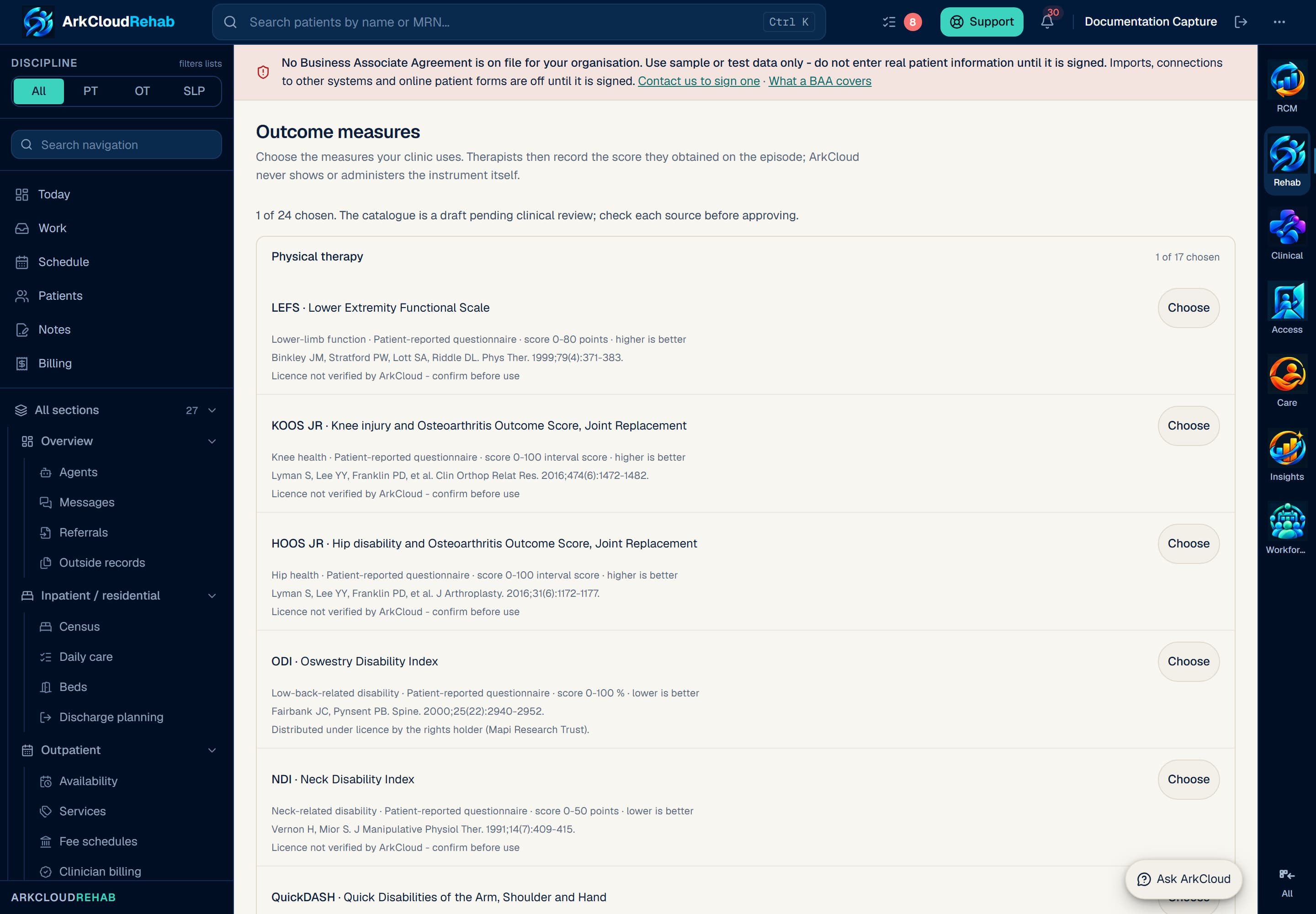
The catalogue a clinic chooses from, grouped by discipline. Each instrument shows its score range, source and licence note. Real screen · synthetic data.
/rehab/settings/outcome-measures
- Open the page from Administration, or from Choose measures for your clinic in an episode's Outcome measures panel.
- Instruments are grouped by discipline. Each row shows the domain, whether it is a patient-reported questionnaire, a performance test or a clinician-rated scale, the score range, which direction is better, the source citation and the licence note.
- Select Choose on an instrument your clinic uses.
- Read and tick the statement: I have checked this instrument's source, and our clinic holds any licence or permission its use requires. Clinicians will administer it outside ArkCloud and enter only the score.
- Select Choose followed by the instrument's abbreviation (for example Choose LEFS). The row then shows the date it was chosen.
Stop using withdraws an instrument for new scores. Scores already recorded stay on the episode.
| Field or control | What it means |
|---|---|
| Lower limb, spine and upper limb (PT, OT) | LEFS, KOOS JR, HOOS JR, ODI, NDI, QuickDASH |
| General and pain | PSFS, NPRS |
| Balance, gait and vestibular | BBS, TUG, 10MWT, 6MWT, 30CST, 5xSTS, FGA, ABC, DHI |
| Occupational therapy | COPM (performance and satisfaction entered separately), Box and Block Test, Nine-Hole Peg Test |
| Speech-language pathology | FOIS, EAT-10, VHI-10, MoCA |
The catalogue is a draft pending clinical review, and the episode panel says so.
Record a score you obtained
Episode → Goals & outcomes → Outcome measures
- Open the episode's Outcome measures panel. Recommended for this episode lists chosen instruments that match the episode's discipline, a body region recorded on the body map, or words in the diagnosis - each with its reason. Other measures your clinic uses lists the rest.
- Select the instrument. The form states that ArkCloud does not show or administer it, and offers the source and licence notes.
- Enter the score (or each part, for an instrument recorded as separate scores), How it was tested where the instrument has variants (the Timed Up and Go asks whether an assistive device was used) and the Date obtained, then select Save score.
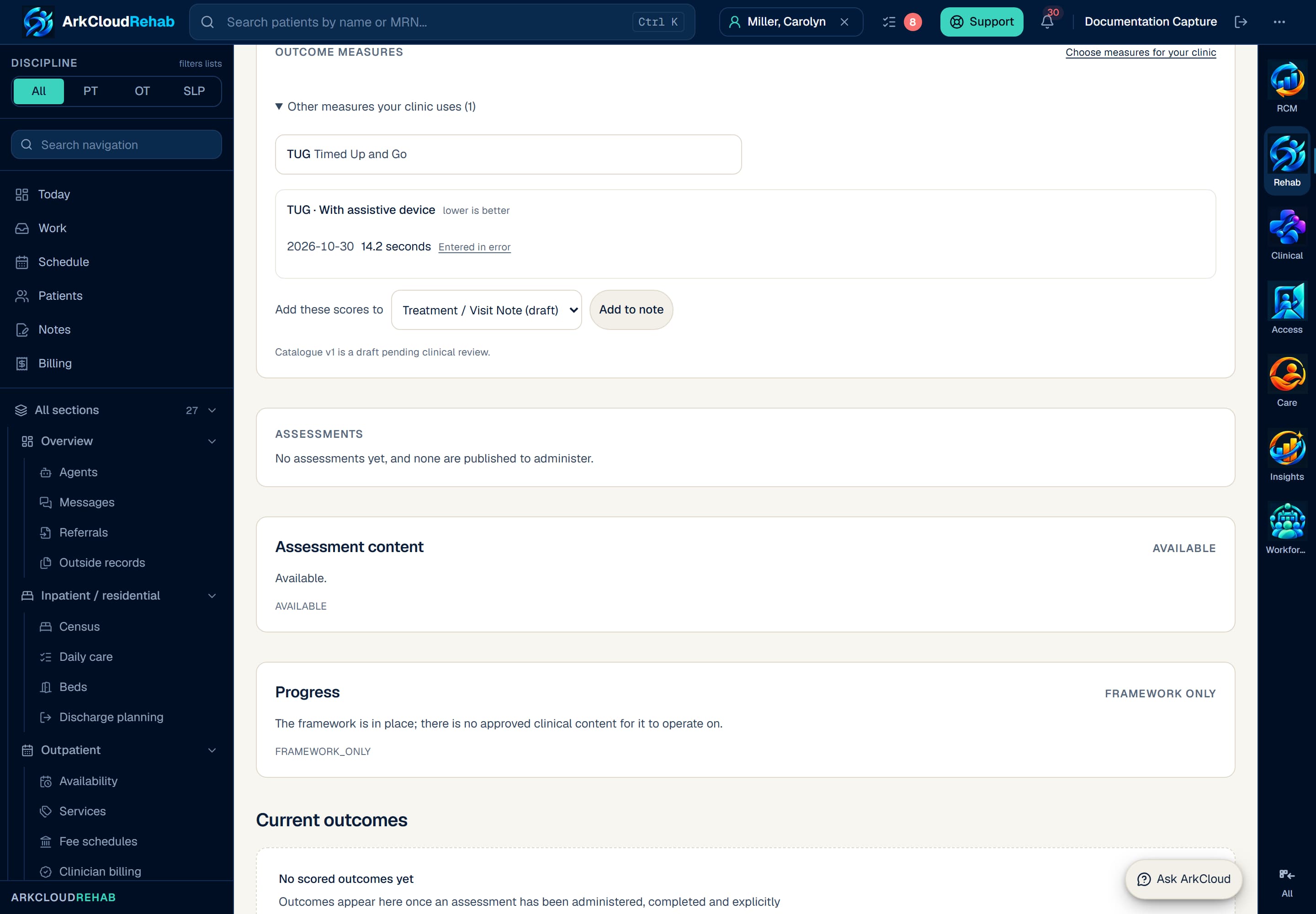
A recorded Timed Up and Go score on an episode, with Entered in error and Add to note. Real screen · synthetic patient.
/rehab/episodes/f8aaf183-0fce-40be-8ec4-6baaf6258580?view=outcomes&task=outcomes
- A value outside the instrument's range is refused with the permitted range. A date in the future is refused.
- Only a score you obtained by administering the instrument under your clinic's licence should be entered. ArkCloud cannot check how the score was obtained.
- Staff whose only role is registration cannot enter scores.
Baseline, latest and change
Each instrument's scores are listed oldest first. The first is the baseline. The latest is compared with it as arithmetic, together with which direction the scale counts as better, and the panel adds No validated change threshold is applied; interpret clinically.
For example (synthetic patient), the line ArkCloud writes for two LEFS scores is:
LEFS (patient-reported questionnaire) on 2026-10-28: 46 points (range 0-80). 8 points higher than baseline (38 points), recorded 2026-10-07; higher scores are better on this scale (no validated change threshold applied).
It never says improved, declined or clinically significant. Whether a change matters is your clinical judgement.
| Field or control | What it means |
|---|---|
| Add to note | Choose a draft note on the episode under Add these scores to, then select Add to note. The score lines are appended to the most suitable section the note has: an Objective section first, otherwise Reassessment findings, Goals met / outcomes, Progress toward goals or Functional limitations. A line already in the note is not added twice. Only an unsigned templated note can receive them. |
| Entered in error | Choose why: Recorded for the wrong patient, Wrong instrument, Wrong score entered, Wrong date, or Recorded twice. The score is kept for the audit trail but removed from the history and from drafts. A note that already contains it is not changed - amend the note if needed. |
| AI SOAP draft | Recorded scores up to the visit date are a source for the AI SOAP draft's Assessment, labelled with their dates. |
| Not used by | The progress report and discharge summary drafts, Reports, Analytics and the dashboard counters. |
Licensing and content
- ArkCloud holds no item wording, response options, forms or scoring keys for any instrument, and never reproduces a questionnaire.
- Four instruments are marked as licensed by their rights holder - ODI, QuickDASH, COPM and MoCA (MoCA also requires training and certification). The clinic must hold its own licence.
- The rest are marked Licence not verified by ArkCloud - confirm before use. A missing licence notice is not permission.
- Choosing an instrument is the clinic's attestation, recorded with who chose it and when.
What is not available
- Digital administration. Patients cannot complete a measure in ArkCloud or the patient portal, and clinicians cannot fill one in on screen.
- Automated scoring. ArkCloud never totals items or converts raw scores. The score is the number you enter.
- Interpretation. No MCID, MDC, cut-off or normative value is applied, and no AI explains a patient's score.
- Reporting across patients. Scores are not aggregated on Reports, Analytics or Insights.
- Standardised functional assessment such as CMS Section GG is not available.
The governed measure registry
ArkCloud Rehab → Records and revenue → Measures
Separately from score entry, ArkCloud has a registry for measures that could one day be administered and scored inside ArkCloud: licence records, evidence provenance, validated scoring implementations, four-eyes review and a publication gate. No measure has passed that gate, so the Measures screen says no approved measure is available, and nothing can be administered or scored there. Interpretation of a score is not implemented, and publishing a measure would not switch it on.
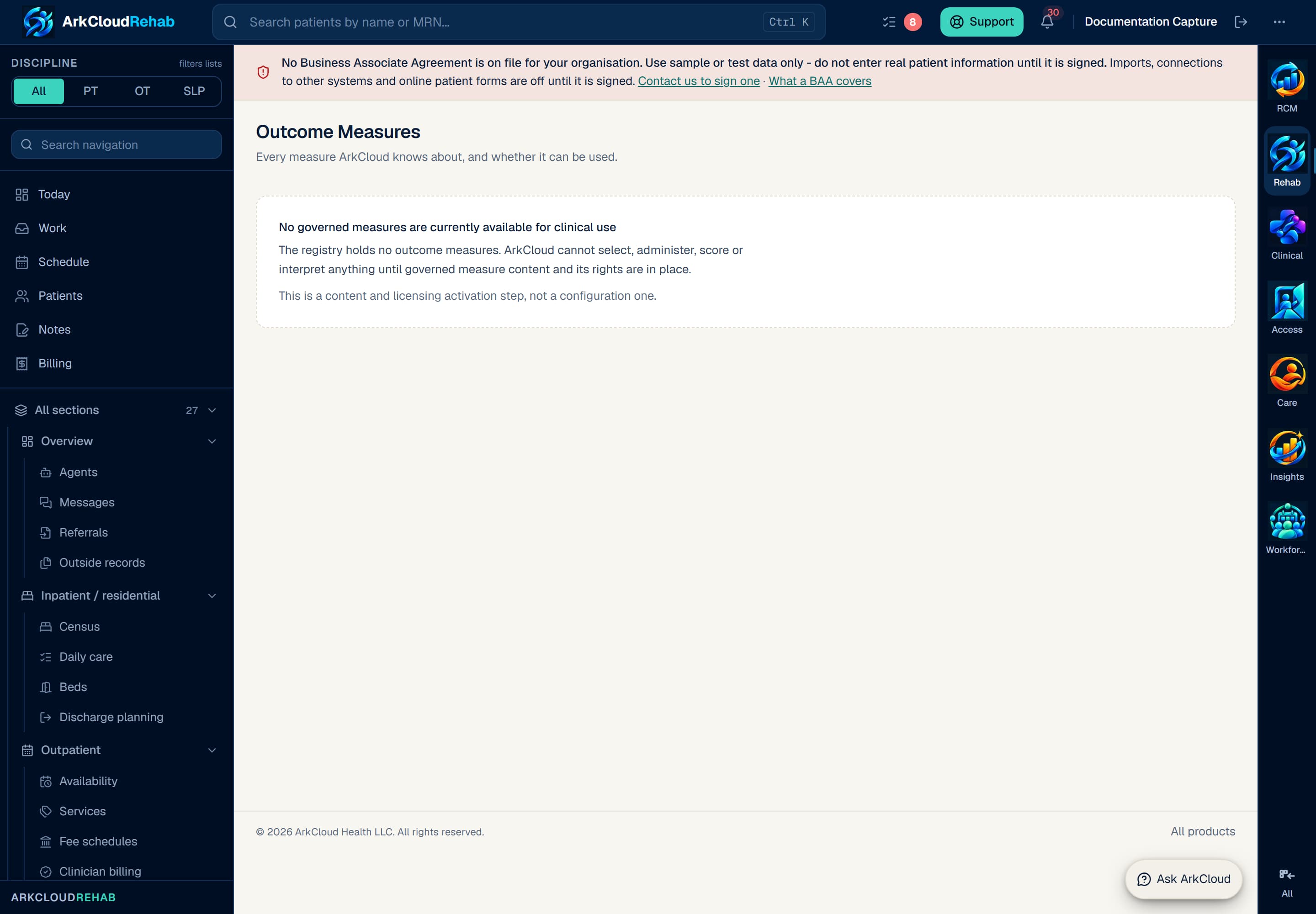
Real screen · synthetic data. The Measures screen for the governed registry, which states that no approved measure is available. This is not where clinic-approved scores are recorded - that is the episode's Outcome measures panel.
Not yet usable. This capability is implemented and cannot be used until something outside the software exists - published clinical content, or a live payer or payment connection. The screen states the reason rather than offering a control that would fail.
/rehab/measures
The Outcomes entry in the sidebar is also different: it reports episode results such as discharges and their financial outcome, not measure scores.