
Getting started
Start here: clinic administrator
What to set up, in what order, so front desk staff and clinicians can work on day one and signed visits are ready to bill. Most of it is done once; the clinic setup checklist tells you what is still missing.
Written for: Clinic administrators · Practice owners setting up ArkCloud
1. First sign-in
- Sign in with your email address and password. See Signing in.
- You are taken to multi-factor set-up before anything else opens. This is required for every administrator. Scan the code with an authenticator app, enter the six-digit code, and keep the recovery codes somewhere you can reach without your phone. See Multi-factor authentication.
- From the launcher, open ArkCloud Rehab.
2. Open the clinic setup checklist
Rehab → Administration → Clinic setup checklist
The checklist works out, from your own records each time you open it, what is done and what is missing: the organisation's billing NPI and tax ID, a location with NPI and address, clinicians ready to sign and bill, supervision recorded for assistants, payers, a fee schedule, the services catalogue, and your record-number, reminder, self-scheduling and documentation policies. Each item links to the page that fixes it. Outside services that are not connected are listed separately.
Clinic setup checklistAvailable
Shows administrators what is in place and what is still missing before go-live (billing identifiers, locations, clinicians ready to sign, payers, fee schedule, services, policies), worked out fresh from your records each time.
3. Add your staff and say what each person does
- Add users. Rehab → Administration → Users. Give front desk staff, clinicians and billers the Agent role, clinic leads Supervisor, and only people who administer the organisation Admin. See Managing users.
- Assign staff functions. Open the Staff functions page (address
/rehab/settings/staff-functions; it is also linked from a patient's intake review). Give front desk staff Registration, clinicians Clinical, and anyone who does both, both. Until you do, everyone can edit registration details and do clinical work. - Set up each clinician to sign for billing. Rehab → Outpatient → Clinician billing. For each PT, OT and SLP, grant their discipline, record their licence with its expiry date, and save their NPI (insured claims need the rendering provider's NPI). Without the discipline grant, a linked staff record and a current licence, a clinician cannot sign notes at all: Sign is refused and says which record is missing. Without an NPI they can sign, but insured visits are held from billing. The setup checklist also flags assistants (PTA, OTA) who have no supervision recorded.
| Capability | Status | What that means here |
|---|---|---|
| Registration and clinical staff functions (Rehab) | Available with configuration | Separates registration work (demographics, contact details, insurance, consent) from clinical work (clinical intake review and clinical documentation) for each person. Until a person is given a function, they can do both.Requires: An administrator assigns each person Registration, Clinical or both under Rehab settings, Staff functions. |
| Billable signing authority for clinicians | Available with configuration | A clinician can sign, co-sign or amend a note only when they have a discipline grant for the episode, an active staff record and a current licence; without them the signature is refused. Billing checks the same records again as of the signing date.Requires: An administrator completes each clinician's set-up under Rehab settings, Clinicians, including their staff record and licence. |
Why there is no "therapist" role: Roles and permissions.
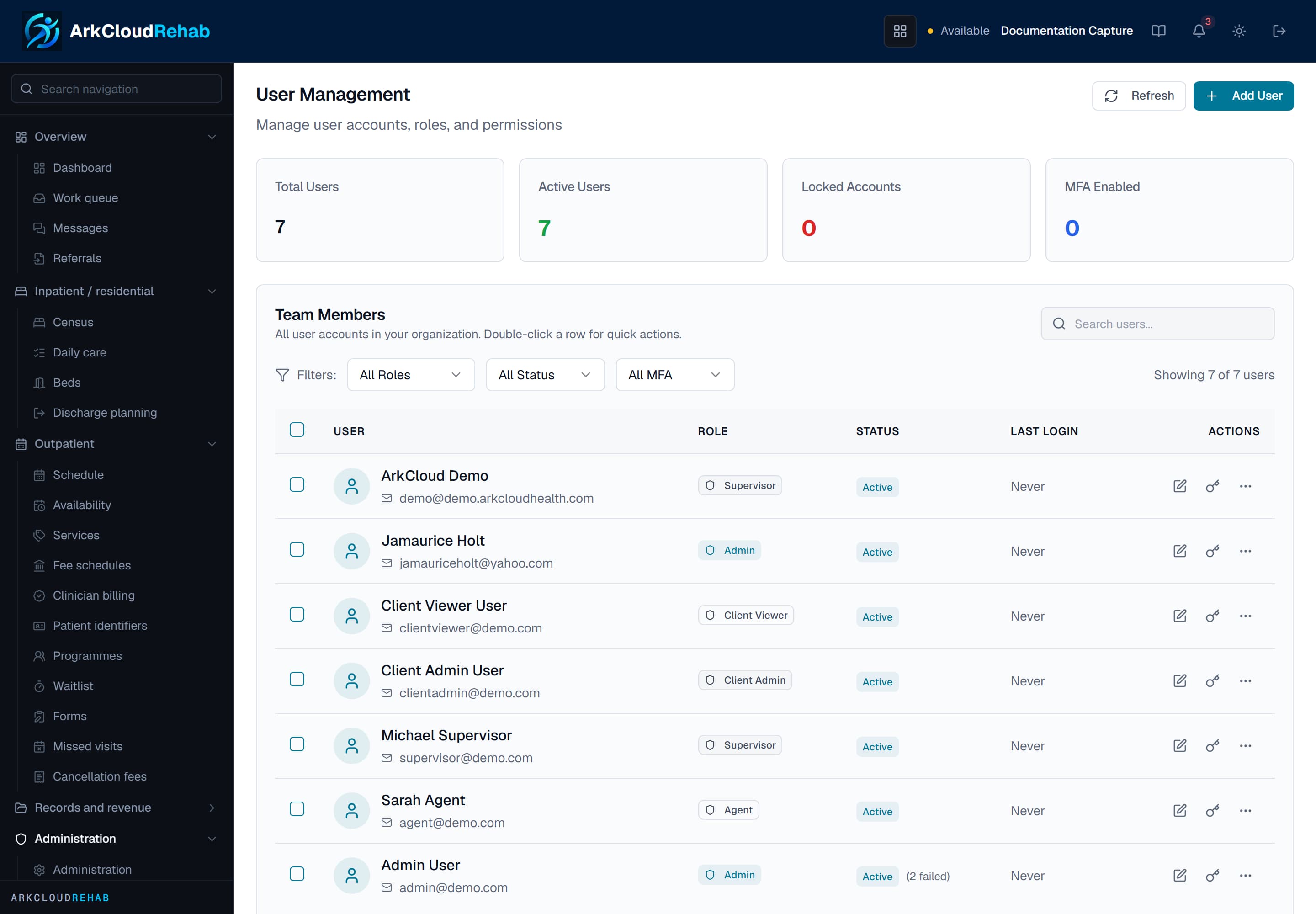
Real screen · synthetic data. User administration in Rehab, listing each account with its role and status.
/rehab/admin/users
4. Services, availability, payers and fees
| Field or control | What it means |
|---|---|
| Services | The services you book (for example a PT initial evaluation or an OT follow-up visit). The service a visit is booked under is what the completed visit records as its billable service. See Services. |
| Availability | When each clinician can be booked. |
| Fee schedules | What you charge for each service. |
| Payers | The insurers you bill, set up by an administrator. See Payers. |
5. AI, outcome measures and the patient AI agreement
| Field or control | What it means |
|---|---|
| AI switch | Settings → AI. One switch for every AI feature in your organisation. It is on unless you turn it off; rule-based features keep working when it is off. Read What the AI does and does not do before deciding. |
| Outcome measures | Rehab → Administration → Outcome measures. A clinic lead approves each instrument the clinic will record scores for, confirming the clinic holds any licence it needs. Clinicians give the measure outside ArkCloud and enter the score. See Outcome measures. |
| Patient AI agreement | Rehab → Forms. Optional. Install it if you want each patient to choose whether AI helps draft their visit notes and whether visits may be recorded. Have its wording reviewed for your jurisdiction first. See Clinical safety. |
| Documentation templates and progress reports | Rehab → Administration. Record your practice's review of each documentation template, and set when progress reports fall due (every so many visits or days). With no policy set, no progress report is ever shown as due. |
| Capability | Status | What that means here |
|---|---|---|
| Organisation AI switch | Available | One switch turns every AI feature off or on for your organisation. It is on unless an administrator turns it off, and rule-based features keep working when it is off. Visit recording has its own setting and is not controlled by this switch. |
| Patient AI agreement | Available with configuration | A form the patient signs with two separate yes-or-no choices: AI-assisted notes, and audio recording. Once installed, it is enforced for AI visit-note (SOAP) drafts and for starting a visit recording.Requires: An administrator installs the agreement on the Forms page, after the practice has reviewed its wording. If it is not installed, nothing is gated by it. |
6. Outside connections (optional)
Electronic claims, eligibility checks, card payments and text-message reminders each need an account with an outside service, and none is connected for your organisation by default. Plan these with ArkCloud; each is described under Integrations, and its current status is on What works today.
Troubleshooting
| Field or control | What it means |
|---|---|
| A clinician's signed visit is not ready to bill | Check Clinician billing: the most common cause is a missing discipline grant or a licence with no expiry date or an expired one. |
| A therapist can still change a patient's address | They have no staff function assigned. Give them Clinical only. |
| A front desk user cannot open Clinical, Care, Insights or Workforce | Those start at Supervisor. Rehab, RCM and Access admit Agents. See Roles and permissions. |