
Patient portal
Making a payment
Where an organisation has online payment configured, a patient can settle a balance by card from the portal. Where it is not configured, the portal says so rather than offering a control that cannot work.
Written for: Patients · Billing teams · Implementation teams
First, is online payment available to you?
Online payment depends on the deployment and on whether your organisation has connected its own payment account, so the answer differs between organisations using ArkCloud. You do not need to ask anyone - the account screen tells you:
| Field or control | What it means |
|---|---|
| A Make a Payment button | Online payment is set up for this organisation. Follow the steps below. |
| A notice reading 'Online payment isn't available yet' | Online payment is not configured for this organisation. The balance and charges shown are still current; payment is taken by the billing office. |
| A 'Saved cards and AutoPay' panel reading 'Online card payments are not available at this practice right now' | Shown below the balance in the same situation. Cards cannot be saved and AutoPay cannot be turned on until online payment is set up; the billing office can say when it will be. |
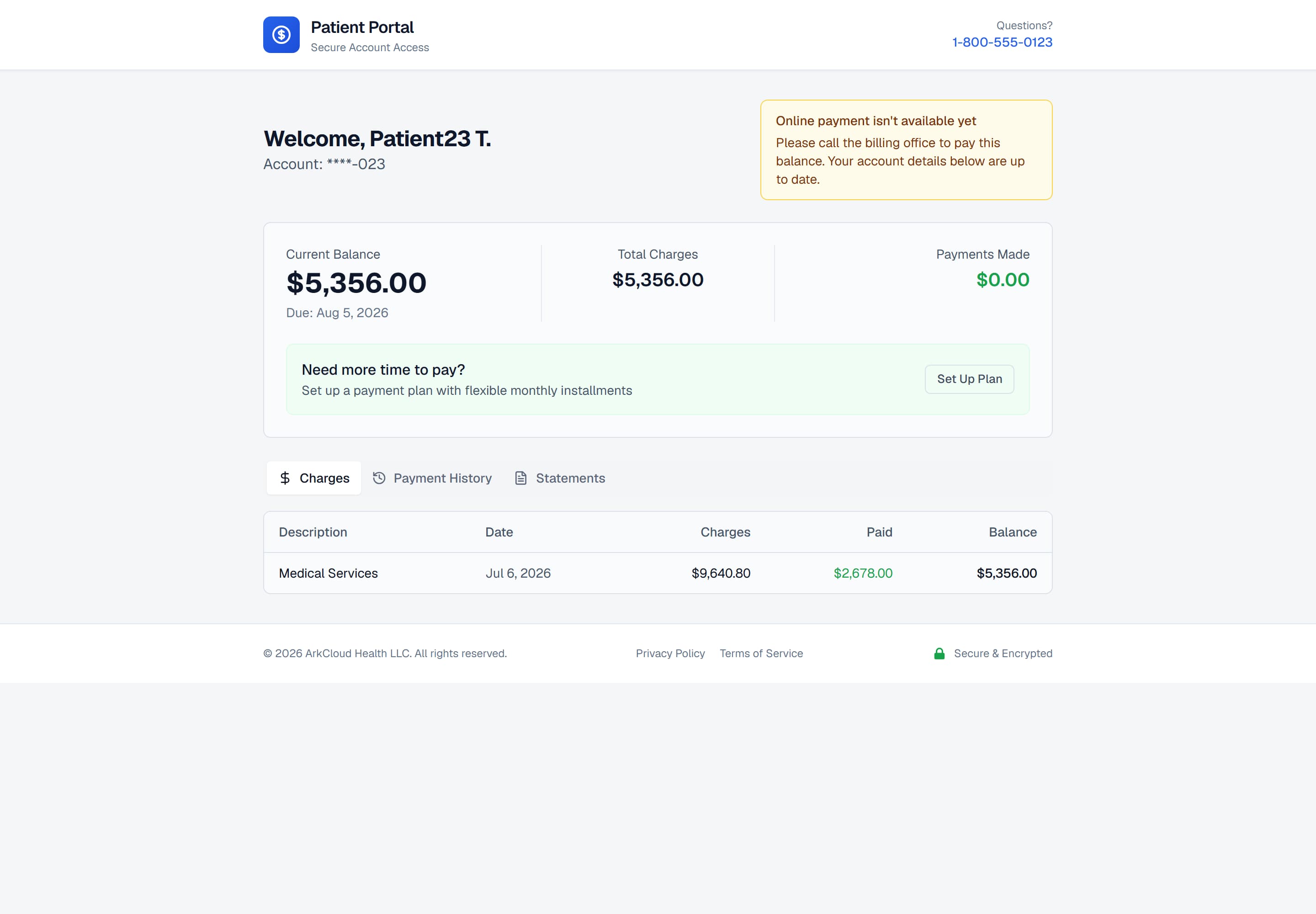
An account in an organisation where online payment is not configured. The notice appears where the payment button would be, so the absence is explained rather than left as a gap the patient has to interpret.
/portal/accounts/{access code}
Paying by card
- Open your account from your link and confirm your date of birth.
- Select Make a Payment.
- Enter the amount. You may pay the full balance or part of it, down to the organisation's minimum ($5 unless it has set another). Any convenience fee the organisation charges is shown before you pay.
- Enter your card details in the card form and confirm.
Expected result: a confirmation with a receipt number. Once the payment processor confirms the payment to ArkCloud - normally within seconds - it appears under Payment History and the balance is reduced.
When you cannot pay online
Call your provider's billing office - the portal itself does not show a phone number, so use the one on your paper statement or the provider's usual contact details. The current balance in the portal is the figure to quote.
A payment taken by phone is recorded by staff against the same account in ArkCloud RCM, so it reduces your balance in the same way an online payment would. It is not listed in the portal's Payment History tab, which shows portal payments only.
For implementation teams
Whether the portal offers payment is decided by three independent things, and all three have to be true:
- The access link permits payment. Links carry a type and not every type allows it - though every link the product issues today is a full-access link that does.
- The deployment has a live payment processor. Stripe keys are set and payment mode is not "stub". This is deployment configuration.
- The organisation has connected its own Stripe account. Patient payments are made to the practice's account and never fall back to ArkCloud's. An administrator connects it under Settings → Payments, and Stripe must have enabled charges on it.
Outcomes a payment can have
These are the outcomes of ArkCloud's server-side payment path. The wording is what the patient sees; the code beside it is what the organisation's support team will find in the logs. Where Stripe is live, the card itself is checked in Stripe's card form first, so card problems (a decline, a failed bank authentication) are reported there in Stripe's words, and the minimum and maximum amount checks below are applied before the form opens.
| Field or control | What it means |
|---|---|
| Paid | SUCCEEDED. A receipt number is shown and the balance is restated. The receipt number, not the balance on screen, is the thing to quote to the billing office. |
| Online payment is not enabled for this practice yet | PROCESSOR_NOT_CONFIGURED. No live payment processor on the deployment, or the organisation has not connected its Stripe account. Nothing was charged and nothing was recorded. As of 1 October 2026 no processor is configured on the production deployment, so the portal shows the not-available notice instead of a payment button. |
| This payment is already being processed | IN_FLIGHT. The same payment was submitted twice - usually a double tap, or a refreshed page. The first attempt is still running. Wait, then check payment history; do not retry with a new amount. |
| Already paid (no second charge) | DUPLICATE. A retry carrying the same payment reference as a completed payment. The original receipt is returned unchanged. The card is not charged again - this is the guarantee the idempotency key exists to give. |
| We could not reach the payment processor | PROCESSOR_UNAVAILABLE. The processor did not answer, so whether the card was charged is genuinely unknown. The payment is left as PROCESSING. Check payment history before retrying; retrying blind is how a patient gets charged twice. |
| The card was declined | DECLINED. The decision belongs to the card issuer. ArkCloud passes on whatever reason the processor gives and adds none of its own. |
| This account has no balance due | ZERO_BALANCE. Nothing is owed. The portal will not take a payment it cannot apply. |
| Minimum payment amount is $X | BELOW_MINIMUM. The organisation sets the floor. Pay at least that amount, or arrange a payment plan. |
| Payment cannot exceed balance of $X | EXCEEDS_BALANCE. Overpayment is refused because the portal has nowhere to put a credit. Partial payment is allowed and normal. |
| That payment reference was already used for a different amount | KEY_CONFLICT. A payment reference is bound to the amount it was created for. Seeing this means a retry changed the amount - start the payment again rather than editing it. |
| Payment not allowed with this access level | The access link is view-only. Balances and statements are visible; payment is not. The organisation issues a link with payment enabled. |
Troubleshooting
| Field or control | What it means |
|---|---|
| No payment button and no notice | The access link may not permit payment. Links issued by the product today all permit it, so this is rare; ask the organisation to issue a new link. |
| The payment succeeded but the balance is unchanged | Reopen the account. If it is still unchanged after a few minutes, contact the billing office with the receipt number; the payment is recorded against the receipt even when the display lags. |
| The card was declined | The decision comes from the card issuer, not from ArkCloud; the message shown is the one the processor returns. Contact your bank or use another card. |
| I want to pay part of the balance | Supported. If you want a scheduled arrangement instead, see payment plans. |