
ArkCloud Insights
Reports
One report, printable and exportable as CSV: point-in-time record counts across the products your organisation uses. Deliberately one rather than a report builder that half works.
Written for: Operations leadership · Analysts · Evaluators
The platform activity report
Launcher → ArkCloud Insights → Reports
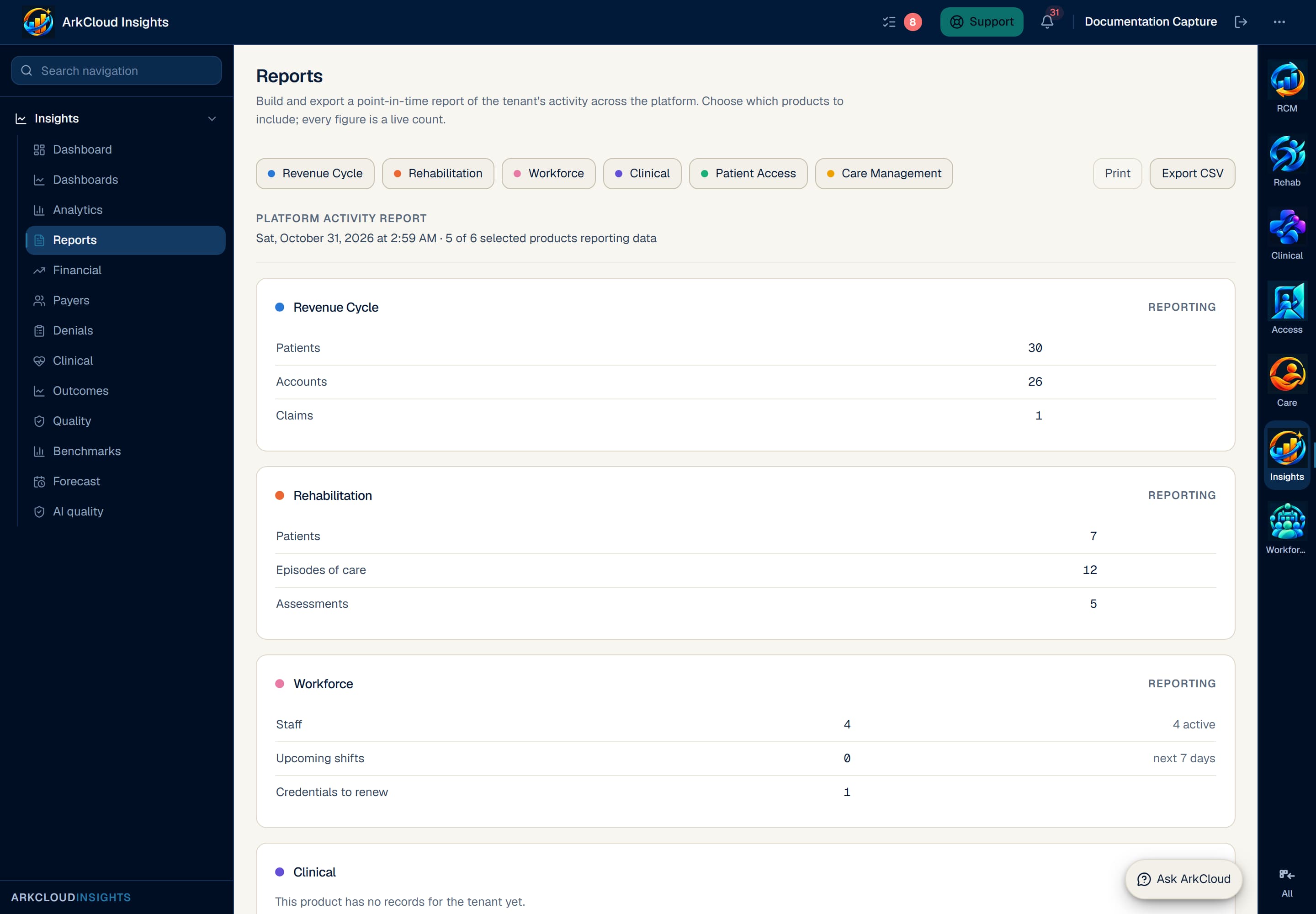
The platform activity report with its product toggles, Print and Export CSV actions. It shows current totals of the organisation's records in each product, as of the moment the page was loaded.
/insights/reports
- Open Reports in ArkCloud Insights.
- Toggle the products you want included. All are selected to begin with.
- Read the result, choose Print, or choose Export CSV. The CSV is built in your browser and its header records when the report was generated.
Expected result: a table of current counts for each selected product, and a CSV export containing the same rows.
What it counts
| Field or control | What it means |
|---|---|
| Activity | Current totals of your organisation's records in each product - for example RCM patients, accounts and claims; Rehab patients, episodes and assessments; Workforce staff, shifts in the next 7 days and credentials due for renewal. These are point-in-time counts, not activity over a chosen period. |
| Scope | Your organisation only. There is no cross-organisation comparison and no benchmark. |
| Basis | Records that exist. Nothing is estimated, projected or imputed to fill a gap. |